 TreiD
TreiD
Introduction
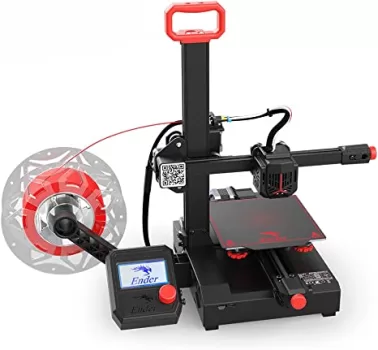
The Creality Ender 2 Pro, priced at $170, offers budget-friendly 3D printing with an emphasis on portability. While delivering quality prints, it lacks advanced features seen in higher-priced models like the Prusa MINI+. As part of the Ender 3 ecosystem, potential modifications are restricted due to Creality’s limitations on the V2.4.v4 motherboard source code. The printer’s 165 x 165 x 180 mm print volume may limit larger projects. Considering an $80 upgrade to the Ender 3 Pro provides a larger build volume and similar features.
The Good, The Bad and The Ugly of 3D printers
All in all, the Creality Ender 2 Pro is a user-friendly and versatile 3D printer that offers a great starting point for designers looking to expand their 3D printing knowledge.
- Printing quality6
- Ease of use6
- Build quality4
- Printing speed1
- Community support3
- Features3
- Reliability2
- Customer support1
- Pro: 90% pre-assembled
- Pro: High quality prints can be obtained
- Con: Firmware is not Open Source
- Con: Fan noise
Hands-on review by TreiD: his own printer, prints and measurements. How we score Affiliate disclosure
I had an Ender 2 Pro myself. I printed around 100 hours on it, and then I returned it because of the fan noise and the heat creep. Every “In my experience” below comes from that printer.
Performance breakdown
Printing Quality
In my experience, I printed mostly at 0.16 and 0.2 mm layer height, and the cleanest results I got were at 0.2 mm. At 0.16 mm I got a lot of clogs and under-extrusion, and also heat creep. The single-arm gantry didn’t sag, and it was good for most prints. My best-looking print was the 3D Benchy, the one included in the files on the SD card delivered with the printer.
Score: 6/10 · On our review scoring, printing quality 6 means: Above average quality, some minor imperfections. (Surface Finish: Good, Detail Accuracy: Good)
Measured: cleanest results at 0.2 mm layers; 0.16 mm layers brought clogs, under-extrusion and heat creep; no sag on taller prints, on my Ender 2 Pro (reported 2026-10-12).
⚠ Estimate: surface finish was judged by eye; no calibration cube was measured.
Ease of use
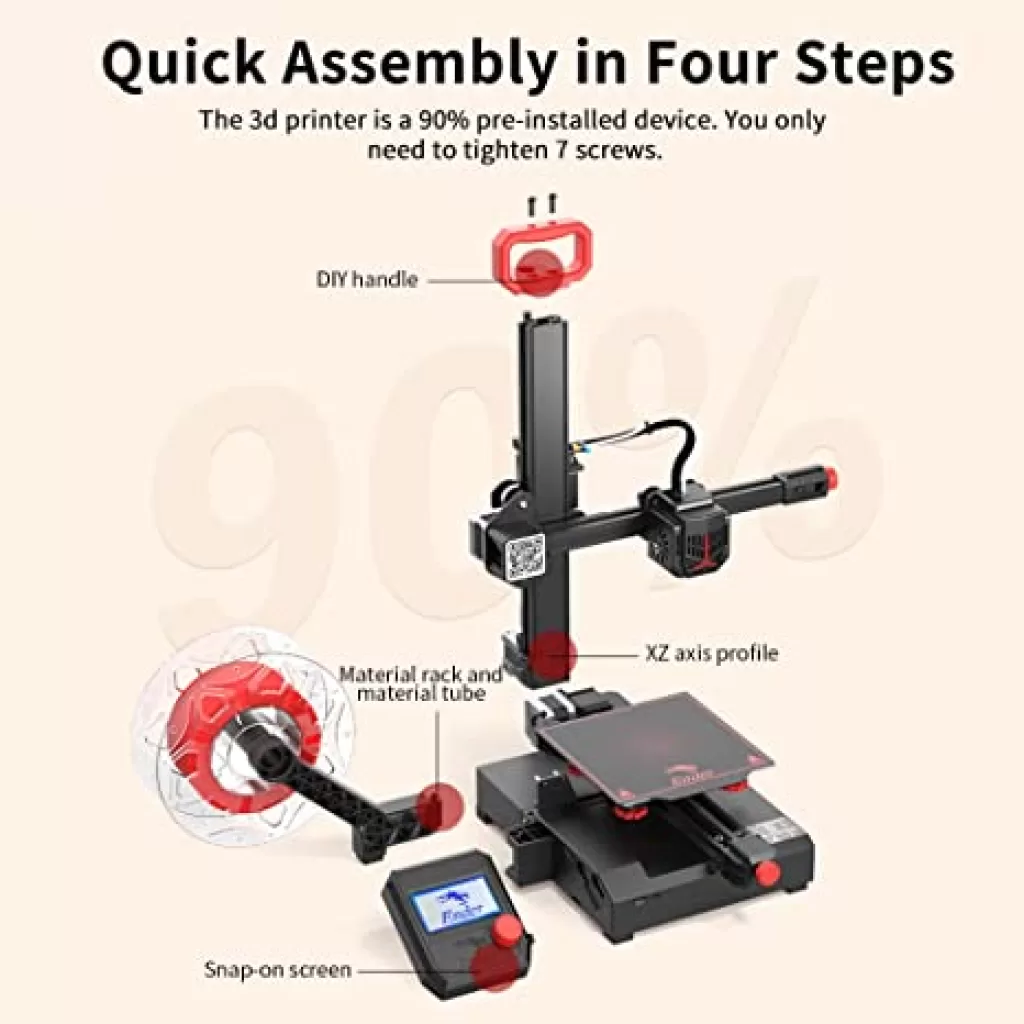
The Ender 2 Pro’s setup kit includes essential tools like a nozzle cleaner, spare nozzle, Bowden connectors, and a microSD card with a USB adapter. A small sample of white PLA enables immediate printing. The absence of a squeegee to protect the bed’s soft surface is notable. However, instructional resources on the microSD card, including a video and PDF manual, guide assembly and initial prints. Creality Slicer 4.8.0 and various print templates offer experimentation options, featuring a rabbit, alternate handles, and a spaceship.
Before using the printer, correctly adjust eccentric nuts for smooth X and Y guide movement. With two eccentric nuts on the Y-axis and one on the X-axis, adjust by a quarter turn if any impediments are detected. Proper strap tensioning is crucial—tight enough to spring back when pressed but not excessively tight. Utilize the strap tensioning knobs for necessary adjustments.
In my experience, unboxing to first good print took me about 35 minutes, but that is because I had experience assembling 3D printers. It wasn’t adjusted out of the box: you had to do that yourself, and bed leveling was manual only. Since Creality didn’t publish the source code of the Marlin they used on the board, you couldn’t enable assisted bed leveling in the firmware; you were locked out.
I didn’t use the bundled Creality Slicer; I went with PrusaSlicer and Cura. The monochrome screen and knob weren’t anything new, that was the technology on most printers of that time, and it just worked. Too bad the screen stayed on during the night, so there was no chance of sleeping in the same room with the printer.
Score: 6/10 · On our review scoring, ease of use 6 means: Quick setup, minimal difficulties in calibration. (Setup Time: 50-60 minutes, Calibration Process: Mostly user-friendly, User Interface: Clear but with a few issues)
Measured: about 35 minutes from unboxing to first good print; manual-only bed leveling, redone every 3 to 5 prints, on my Ender 2 Pro (reported 2026-10-12).
⚠ Estimate: 35 minutes fits the 30-50 minute setup time of a 7, but I had assembled printers before, and manual leveling every 3 to 5 prints is not user-friendly calibration, so it stays at 6.
Build Quality
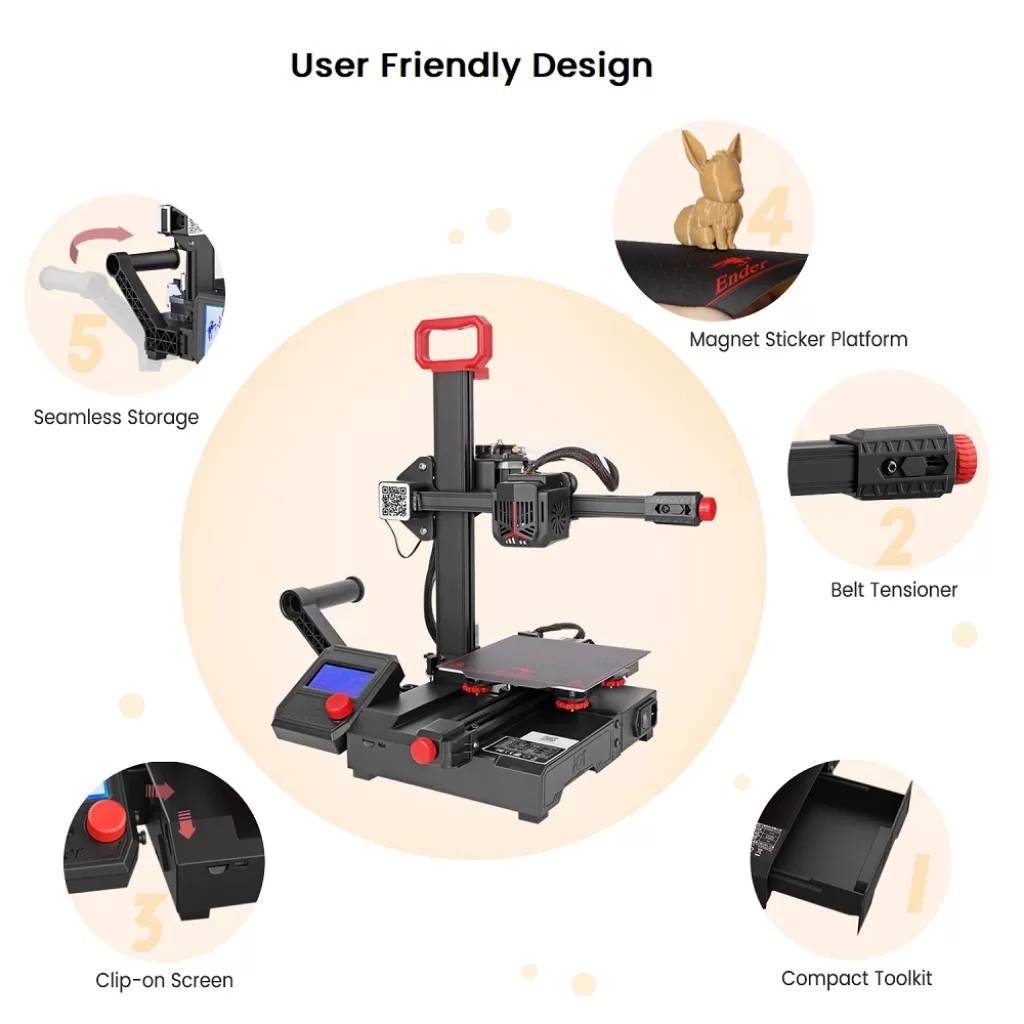
Weighing 3.5 kg, the Ender 2 Pro’s compact, portable design includes a top-mounted handle for easy carrying. The X-gantry’s single Z-axis, utilizing a cantilever design, features a plastic base and an extruded aluminum frame. The Z-axis, secured with four screws and reinforced with a bracket, eliminates wobble. A handle loop on the back protects the Z-axis from accidental bumps. The power supply, base plate, and a convenient tool drawer are within the base.
In my experience, the cantilever gantry did not drift out of level, but the most annoying thing was that it suffered from heat creep, and most of the time I had the hotend clogged. The bed surface was very fragile: once the hotend just dropped onto the build plate and made a big scratch. Nothing broke on mine, but it was flimsy enough.
Score: 4/10 · On our review scoring, build quality 4 means: Subpar build quality, noticeable flaws in materials or construction. (Frame Material: Subpar, Component Durability: Subpar, Vibration Resistance: Subpar)
Measured: no gantry drift; recurring heat creep and hotend clogs; the bed surface scratched when the hotend dropped onto it; nothing broke, on my Ender 2 Pro (reported 2026-10-12).
⚠ Estimate: frame stiffness and vibration were judged in use, not measured; the gantry holding level is better than this score’s “subpar” vibration resistance.
Printing Speed
In my experience, the print speed was about 40 mm/s, because of the heat creep: going faster than that, you ended up with a failed print. So I did slow it down, due to the heat creep. My timed test print took 1 hour 45 minutes.
Score: 1/10 · On our review scoring, printing speed 1 means: Extremely slow print speed, inefficient printing. (Print Speed: <50 mm/s, Max Speed: <100 mm/s, Default Acceleration: <500 mm/s², Max Acceleration: <1000 mm/s², Efficiency: Poor)
Measured: manufacturer spec max 60 mm/s; I printed at about 40 mm/s, and my timed test print took 1 hour 45 minutes, on my Ender 2 Pro (reported 2026-10-12).
⚠ Estimate: acceleration was not recorded; the 40 mm/s limit came from heat creep on my unit.
Community Support
In my experience, community support was minimal. Some help came from the Creality groups on Facebook, but it was limited: not many users had this printer. I found only a few Ender 2 Pro-specific mods.
Score: 3/10 · On our review scoring, community support 3 means: Small community, basic guides available. (Online Community Size: 600-1000 users, Availability of Guides: Basic, Responsiveness in Forums: 24-48 hours)
Measured: Facebook Creality Ender Series – User Group 30.8K members; Discord Creality 3D Official 24.7K members (3.3K online), brand-wide; Forum forum.creality.com 37.1K members (2.3K active in 30 days), brand-wide; Facebook Creality Official User Group 152K members, brand-wide (counted 2026-10-12).
⚠ Estimate: these counts are for the whole Ender series or the whole brand, and size alone would fit a 10; few of those members owned an Ender 2 Pro, so the score rests on how little printer-specific help I found.
Features
The Ender 2 Pro ensures a user-friendly printing experience with adjustable belt tensioners and a magnetic bed for easy print removal. While the TMC 2208 drivers contribute to a quieter motherboard, the overall noise remains relatively high due to the motherboard fan. The side-mounted filament holder enhances balance and reduces vibration compared to the older top-mounted Ender 2, featuring the standard Creality hotend, extruder, and Bowden tube design found in the Ender 3. The machine’s LED screen, a monochrome display with a selector button, is conveniently detachable without screws for travel or storage.
Flexible and magnetic bed surface
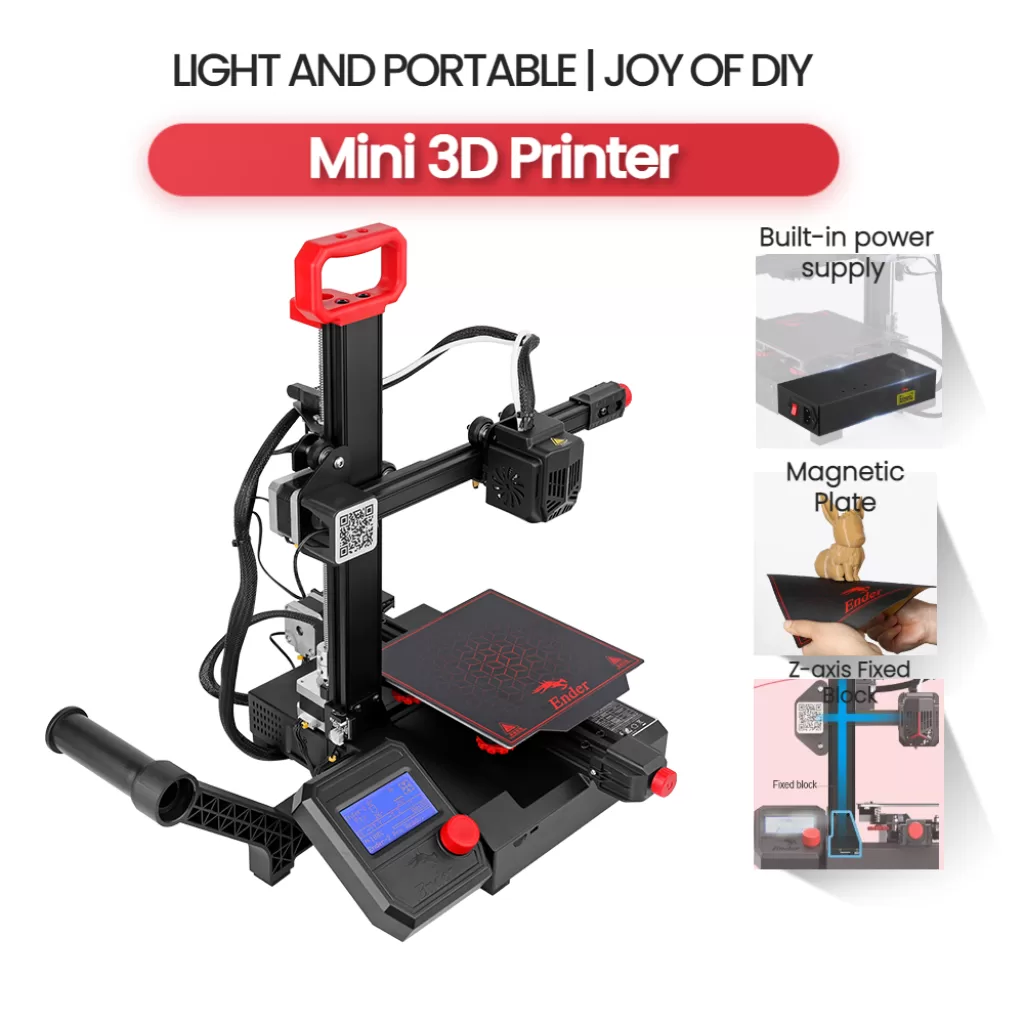
- Heats up to 100°C.
- 5 mm thick, magnetic for easy print removal.
- Minimizes warping, extends filament options.
- Fragile surface; caution with nozzle contact.
Storage compartiment
- Base drawer stores included tools.
- Tools: imbus wrenches, screwdriver, scissors, eccentric guide wheel wrenches, hotend nozzle wrench.
In my experience, the loud fan wasn’t replaced: I returned the printer because of the fan noise and the heat creep. The closed-source board could not be used with anything else, because the firmware was compiled in a different program. I didn’t carry it anywhere, but it needed leveling again after 3 to 5 prints.
The source code request on Creality’s own Ender-2-Pro GitHub repository (issue #1) was opened in April 2022. A partial code branch for the HC32F460 board appeared there in December 2022, but it was built with Keil MDK, which is not free, and owners were still asking for the firmware in October 2023. A community Klipper build for this board now exists (ChubbyBunny1: Ender-2-PRO-Klipper-HC32 on GitHub), made because Creality did not publish the complete Marlin firmware for it.
Score: 3/10 · On our review scoring, features 3 means: Standard features, some upgrade possibilities. (Available Features: Standard, Upgrade Options: Some, Open Source: No, External Upgrades: Limited, Build Volume: <200 mm, Multicolor Printing: No, App: No, Offline: No, Ventilation: No, Filtration: No)
Measured: manufacturer spec: build volume 165x165x180 mm, multicolour no; closed-source board, manual-only bed leveling, re-leveling every 3 to 5 prints on my Ender 2 Pro (reported 2026-10-12).
⚠ Estimate: the printer does print offline from its microSD card, which this score lists as no; a community Klipper build now opens some firmware upgrades.
Reliability
In my experience, I printed around 100 hours with it, and then I got mad about the issues and returned it. At least 45% of my prints failed, and the faults that kept coming back were clogs and heat creep. My longest print was about 10 hours.
Score: 2/10 · On our review scoring, reliability 2 means: Very unreliable, most prints fail. (Success Rate: 50-55%, Consistency: Highly inconsistent)
Measured: at least 45% of prints failed, from clogs and heat creep, over around 100 hours on my Ender 2 Pro (reported 2026-10-12).
⚠ Estimate: the failure rate is my rough count, not a logged one; if more than half failed, this would be a 1.
Customer Support
In my experience, I contacted Creality to ask them to release the source code of the firmware, so I could enable or modify features. They replied in about 7 days, and did not publish it, even though the Marlin license obliged them to. I also asked them to send me a new board that could take different firmware, and they didn’t offer any solution.
Marlin is released under GPL-3.0, and its README states that anyone shipping it “must provide your compatible Marlin source code to end users upon request” (MarlinFirmware: Marlin on GitHub).
Score: 1/10 · On our review scoring, customer support 1 means: Extremely slow response, ineffective problem resolution. (Response Time: >48 hours, Problem Resolution: Ineffective)
Measured: about 7 days to a first reply from Creality; neither the source code nor a replacement board was offered (reported 2026-10-12).
Sum up
By exploring these features, the Creality Ender 2 Pro strikes a balance between affordability, portability, and practicality, catering to the needs of 3D printing enthusiasts.
In my experience, no prints on it were memorable, only frustration. With the options we have today, it doesn’t make sense to buy it, and I’m sure it is not available anymore.
Videos


Where to buy it:
No official store currently sells this printer, and we found no listing of the complete printer on AliExpress or Amazon (checked 2026-10-12).