 TreiD
TreiD
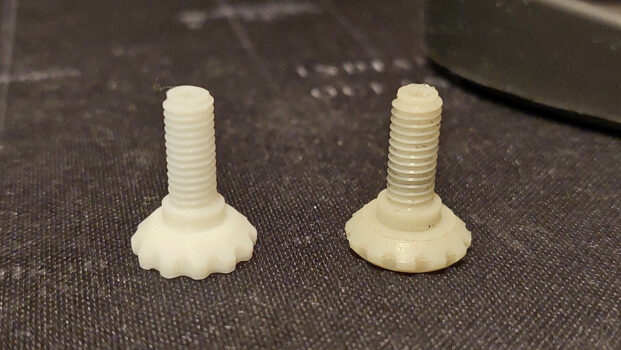
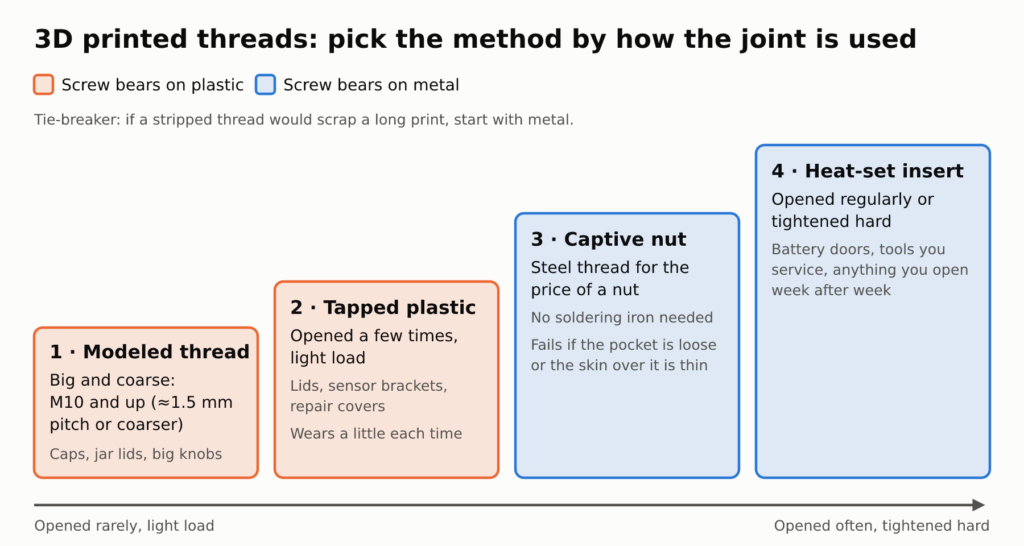
If the part comes apart more than a few times, don’t let 3D printed threads carry it. Put metal in instead: a heat-set insert or a captive nut. Modeled threads are fine for large, coarse joints you open now and then, and threads tapped into the plastic cope with a joint you open a handful of times. The two questions that decide it are how often the part gets opened and how hard someone tightens it, not which method looks neatest in CAD.
What follows is the ranking, the hole sizes and tip-temperature offsets one insert maker publishes, and the print settings that decide whether each method lasts.
Which Thread Method Survives Repeated Assembly: The Short Answer by Use Case
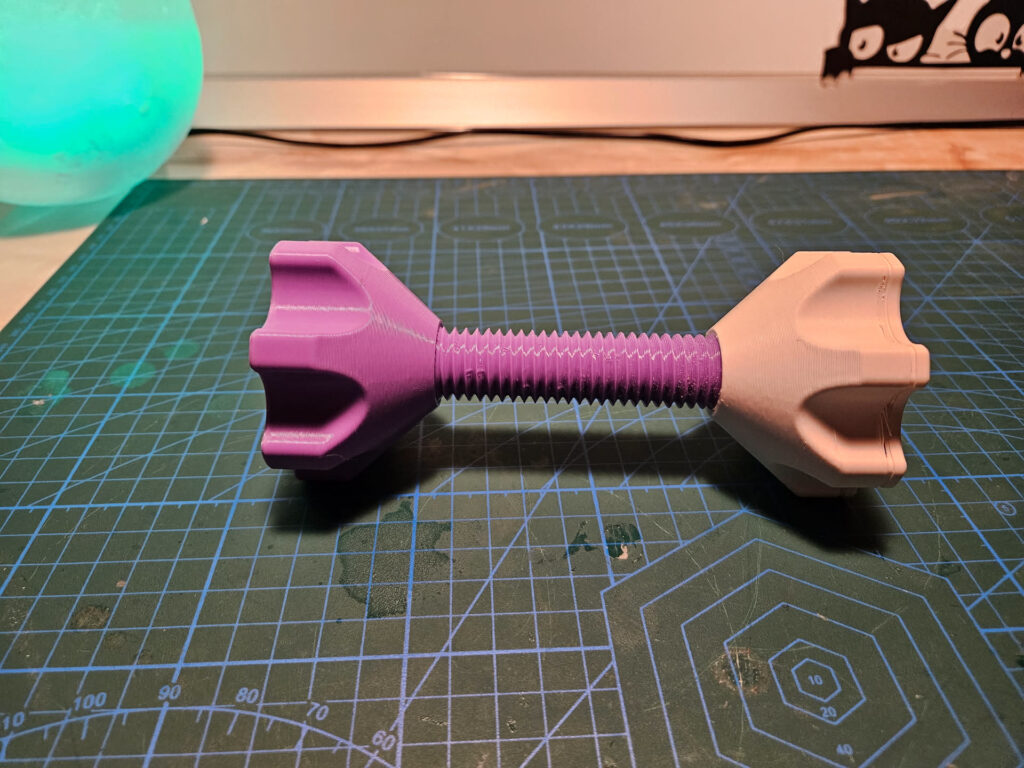
Big, coarse, opened now and then: model the thread. A bottle cap, a jar lid, a big knob or anything around M10 and up (roughly 1.5 mm pitch or coarser on a 0.4 mm nozzle) can carry its own printed thread, because a coarse pitch leaves enough plastic on every flank.
Opened a few times, light load: tap the plastic. A tap cut into solid walls gives a crisp machine-screw thread for a lid, a sensor bracket or a cover you remove for the odd repair. Each reassembly wears the plastic a little. I treat a tapped hole as a joint with a limited life, not a permanent one.
Opened regularly or tightened hard: heat-set insert. In Protolabs’ design guidance, threaded inserts pass the bolt load into the host material over a larger surface area and keep the thread intact for screws that are removed and refitted again and again. The same page calls threads cut straight into plastic weaker than metal ones and suited to low loads. For a battery door or a tool you service, that is the whole point.
No soldering iron: captive nut. A steel nut sitting in a printed hex pocket gives you a steel thread for the price of a nut.
My tie-breaker is simple. If a stripped thread would scrap a long print or a part that’s hard to reprint, it gets metal from the start, even if I only expect to open it twice.
When 3D Printed Threads Hold Up: Thread Size, Pitch, Orientation and Material
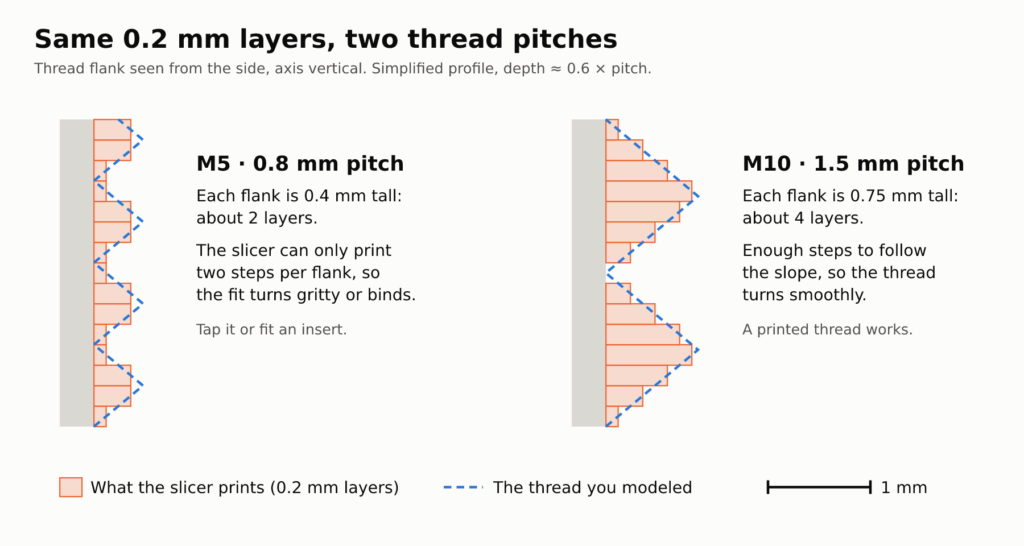
Pitch decides more than diameter does. My working line on a 0.4 mm nozzle is about 1.5 mm pitch or coarser: M10 and up in ISO coarse threads, with M8 at 1.25 mm and M5 at 0.8 mm in AmesWeb’s ISO 4032 table. Finer than that, each flank is only a layer or two tall at 0.2 mm layers, so it prints as a few stair steps and the fit turns gritty or binds. That’s why I’d tap an M5 or fit an insert, and why 3D printed threads suit a bottle cap long before a small machine screw.
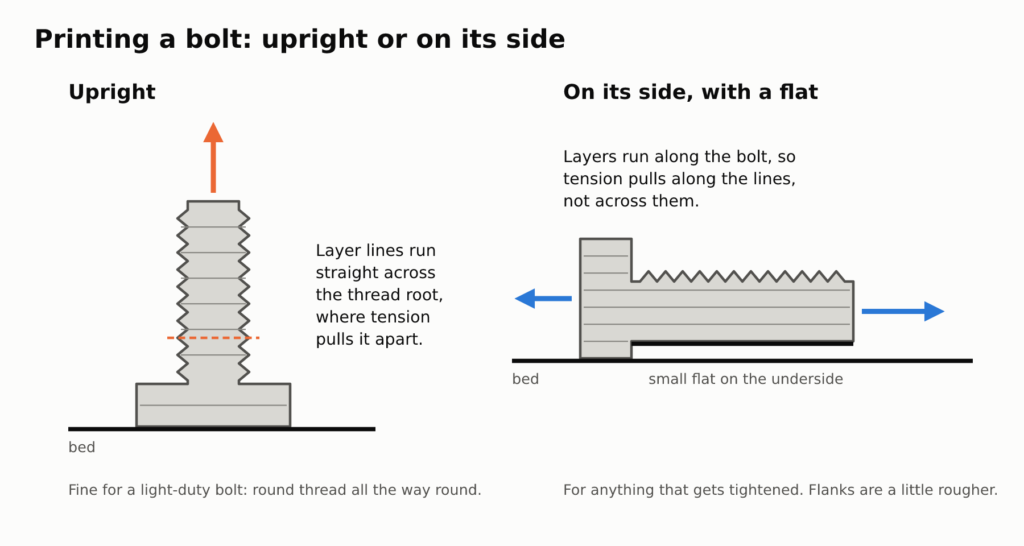
Orientation comes next. Print internal threads with the hole’s axis vertical, so every turn is drawn as a true circle on each layer. A printed bolt standing upright puts its layer lines straight across the thread root, exactly where tension pulls it apart. For anything that gets tightened, I’d lay the bolt on its side with a small flat on the underside and accept slightly rougher flanks there.
Layer height matters most on fine pitches. On my P1S, 0.2 mm is the layer height I use the most and 0.08 mm is the finest I’ve printed, with great results on prints that need extra detail, so a fine thread is where I’d spend the extra print time. The rest of that printer’s story is in my Bambu Lab P1S review.
Material counts too. PLA is stiff and cuts cleanly with a tap, but it softens with heat and slowly gives under a screw that stays tight. PETG is tougher and more forgiving when a thread gets cranked down. The printed parts of my Nalivator, an ESP32-based project I’m building, are in PETG, and it’s the filament I’d start any threaded part in; the trade-offs are laid out in PETG vs PLA for functional parts.
Watch the bottom turn of any thread that starts on the bed. First-layer squish pushes that layer outward, which closes the bottom of a hole and swells the base of a bolt. A chamfer at the bed face hides it, and getting the squish itself right is covered in my first layer troubleshooting steps.
Modeling Printed Threads That Fit: Clearance, Chamfers and Real vs Cosmetic Threads
Clearance is the first thing to plan for. A modeled thread is drawn at nominal size, so 3D printed threads made straight from it have no room to turn. The fix I’d use is to offset the thread faces of the internal part outward, rather than scaling the whole body, so the rest of the part keeps its dimensions.
Then check that the thread is real at all. I design my parts in Fusion 360, where a cosmetic thread is only a visual representation with no geometry behind it, as Nozzle Down’s Fusion 360 threads tutorial puts it, so the STL gets a plain cylinder. Ticking Modeled in the Thread dialog is what generates the flanks, and Chris Bensen’s note on threads missing from STL is a reminder that the box isn’t on by default.
Don’t guess the clearance value. Make it a user parameter and print a coupon a few turns long at four outward offsets on the internal thread faces, say 0.05, 0.10, 0.15 and 0.20 mm; that costs minutes and settles the fit for that printer, filament and nozzle. Keep whichever one turns by hand without rocking.
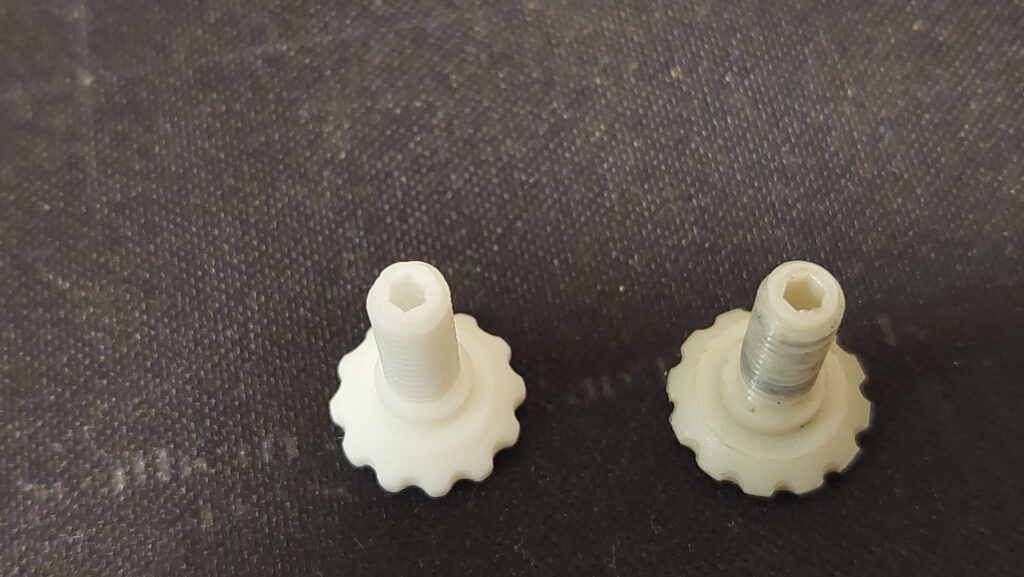
Changing a single parameter and rebuilding is exactly the workflow from my post on parametric design in Fusion 360. Export one STL per offset and all four coupons fit on a single plate.
Chamfer both ends. A chamfer at the mouth of the hole and on the tip of the bolt gives the first turn a ramp instead of a knife-edge start. Stop the thread a little short of each face as well, because a half-turn feathered down to nothing is the first piece to crumble.
If the coupon fits on one spool and binds on the next, check flow before you touch the model. Over-extrusion fattens every flank at once, and extruder calibration fixes it at the source instead of burying it under extra clearance.
Tapping Threads in 3D Printed Parts: Hole Size, Wall Count and When It Wears Out
Tapping only works if the hole is right. For ISO coarse threads, Engineers Edge’s ISO metric tap drill chart gives 2.5 mm for M3, 3.3 mm for M4, 4.2 mm for M5 and 5.0 mm for M6. I’d print the hole a touch under that and open it with the matching drill bit by hand, which trues it up and gives the tap a round start.
Go slowly when you drill and tap. The Engineering Way’s video below on accurate holes and threads in 3D printed parts makes the point that friction heats the plastic, and softened plastic moves and smears instead of cutting cleanly.
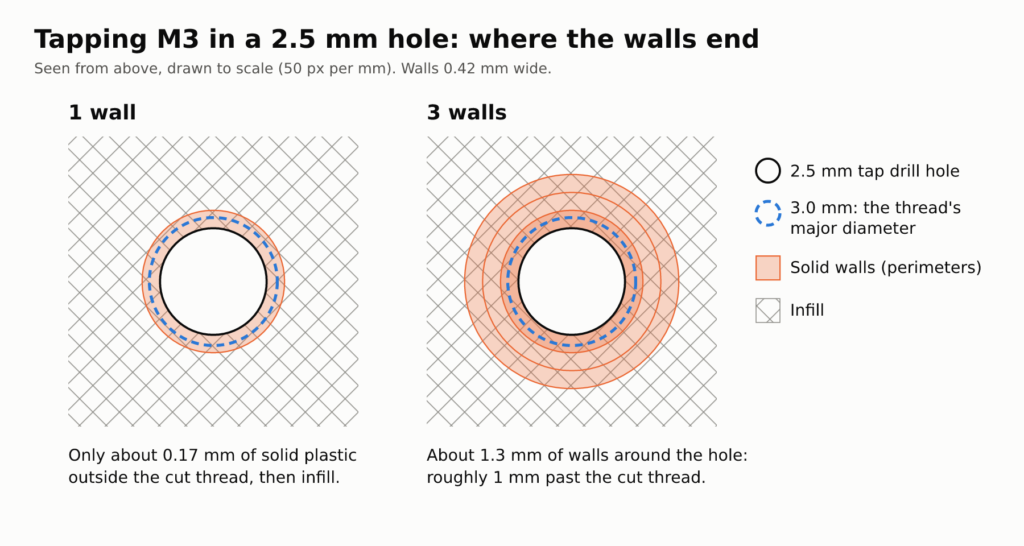
Wall count matters more than infill here. The tap cuts into the walls, so the whole thread has to sit in solid perimeters; if the tap breaks into infill, half the flank is air. My rule: the solid walls should reach well past the screw’s major diameter, not just cover the small gap between the hole and the screw. For M3 in a 2.5 mm hole, at least 3 walls at 0.42 mm give about 1.3 mm of solid plastic around the hole, so the cut thread sits entirely in perimeters.
Tap by hand for the same reason. Back the tap off every turn or two to clear the chips, and blow the chips out before the first screw goes in.
Then accept that it wears. Each time a steel screw comes out and goes back in, it bears on the same plastic flanks. Protolabs’ point from earlier holds: a thread cut straight into plastic is weaker than a metal one and suits low loads, so I’d keep tapping for joints that get opened a few times.
My cheap insurance is to design the boss for a heat-set insert even when I tap first. If the thread starts to go, the same boss takes an insert later instead of needing a reprint.
Heat-Set Inserts: The Default for Parts You Open Often
Heat-set inserts are what I’d put in any joint that gets opened regularly, because the screw then threads into metal rather than into 3D printed threads. As McMaster-Carr describes them, you heat the insert with a soldering tip so the plastic around it melts. As it cools, the plastic fuses to the sharp, diagonal ridges around the insert, and those ridges stop it twisting or pulling out.
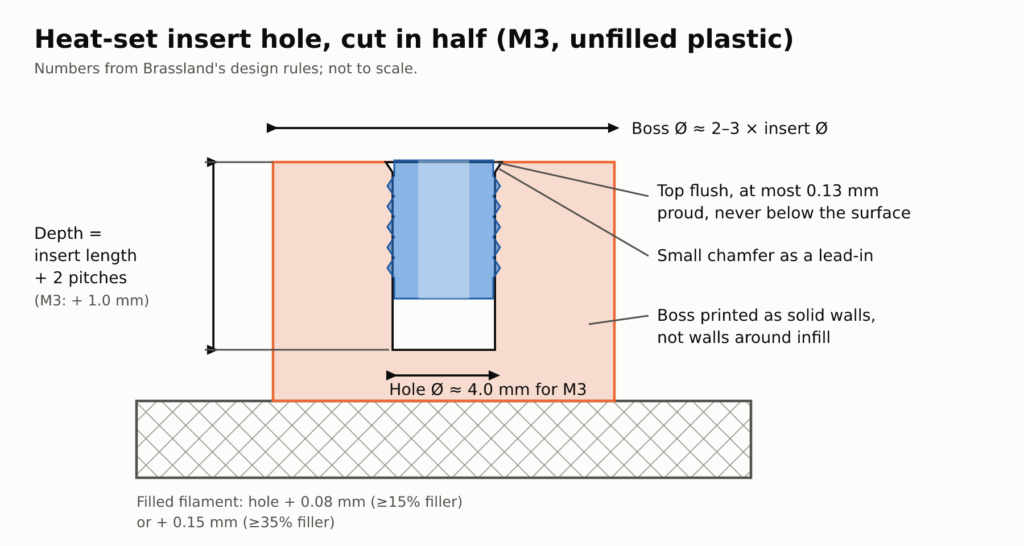
Brassland, a maker of brass threaded inserts, publishes recommended heat-set hole diameters for unfilled thermoplastics: about 4.0 mm for M3, 5.6 mm for M4, 6.4 mm for M5 and 8.0 mm for M6. The hole should be as deep as the insert plus two thread pitches. Those numbers describe the finished hole, not the CAD dimension, so I’d measure the printed hole and adjust, and check the datasheet for the exact inserts you bought.
| Thread | Tap drill | Insert hole |
|---|---|---|
| M3 | 2.5 mm | 4.0 mm |
| M4 | 3.3 mm | 5.6 mm |
| M5 | 4.2 mm | 6.4 mm |
| M6 | 5.0 mm | 8.0 mm |
Filled filaments need a bigger hole. Brassland adds about 0.08 mm for materials with at least 15% filler and about 0.15 mm for materials with at least 35% filler. Check the filler percentage on the datasheet before you size the hole for a carbon- or glass-filled filament.
The boss needs material around the insert: Brassland recommends an outside diameter of about two to three times the insert diameter. In a print, that boss is only as strong as its perimeters. I’d raise the wall count until the whole boss is solid walls rather than walls wrapped around infill.
Set the iron by the plastic, not by habit. Brassland’s rule is the resin’s softening temperature plus about 28 °C for unfilled grades and plus about 83 °C for filled ones. The page is written for molded resins and lists neither PLA nor PETG, so I read it as a direction rather than a setpoint: a filled filament needs a clearly hotter tip than the same plastic unfilled.
I find the actual setpoint on a scrap coupon printed in the same filament, with the same wall count as the real part, before the iron goes near the part itself.
Model the hole for the iron. McMaster’s insert kit page says heat-set inserts go into straight holes that are drilled, printed or molded, and for its tapered inserts you drill a straight hole and taper the top half. On a straight hole I’d add a small chamfer in CAD as a lead-in, so the insert starts square. Protolabs’ notes on threading and inserts add the practical bit: the iron heats the insert and the plastic around it, so leave room, about 6.35 mm (0.25 in.) around an insert when features surround it on all sides.
For the press itself, use a dedicated insert tip on the iron rather than a plain conical one, so the heat goes into the insert and the tip can’t slip off. Let light pressure sink the insert as the plastic softens instead of forcing it down. Brassland’s target is the top flush with the surface, at most 0.13 mm proud and never below it. If the insert tilts, Protolabs notes the iron is often used to perfect its alignment after it’s pressed in, so straighten it before the plastic cools.
Print the insert hole with its axis vertical, so it comes out round and the insert goes in square.
Captive Nuts and Self-Tapping Screws: Cheap Alternatives and Where They Fail
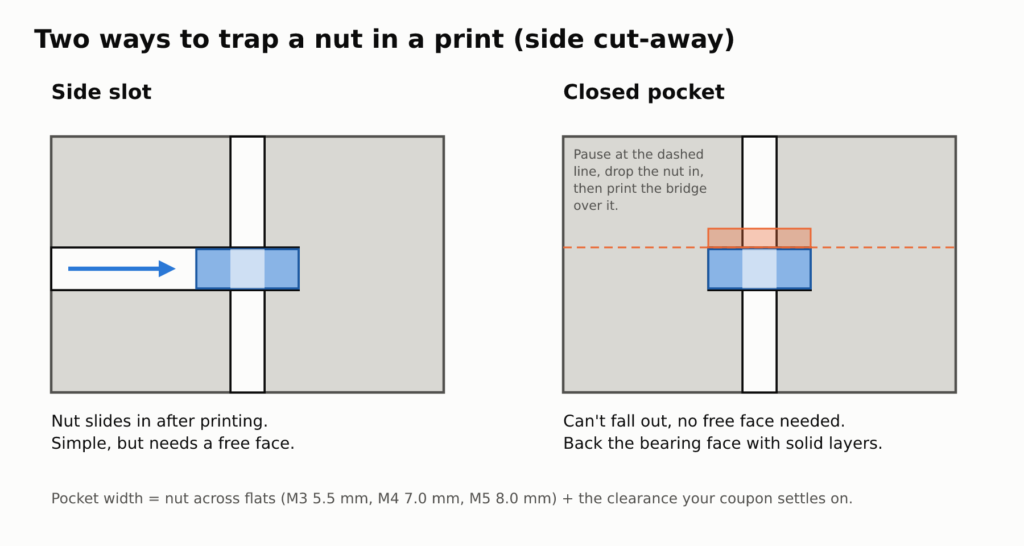
A captive nut is the cheapest metal thread you can add. ISO 4032 hex nuts measure at most 5.5 mm across the flats for M3, 7.0 mm for M4 and 8.0 mm for M5 in AmesWeb’s table, so model the hex pocket at that width plus the clearance your coupon settles on (the coupon trick from the modeling section works here too). The plastic then only has to stop the nut spinning and keep it from pulling through, while the thread itself is steel on steel.
Captive nuts fail in two ways. A loose pocket lets the nut spin, usually right when you need it to bite, and a thin skin over the nut lets it pull through under load. Put the pocket on the side the load pushes the nut into, and back the bearing face with several solid layers or walls rather than a thin cap.
There are two ways to get the nut in. A side slot open to one face takes the nut once the print is finished. A closed pocket means pausing at the right layer, dropping the nut in and resuming, with a bridge printed over the top. The slot is the simpler of the two; the embedded nut can’t fall out and doesn’t need a free face.
Self-tapping screws are the quickest option of all, but the screw cuts or forms its own thread in the plastic, so they belong in the tapped-plastic tier.
When you put a self-tapping screw back in, turn it backwards first until you feel it drop into the existing thread, then drive it forward. Skip that and the screw starts a new thread beside the old one, and two half-threads hold less than the one you started with.
Fixing Threads That Are Too Tight, Too Loose or Stripped
Too tight: run a tap or die through it before you reprint, which clears stray strings and the squished first turn. If the next print binds too, check flow first, then raise the clearance parameter one step and print a fresh coupon. A thread that binds only at the bottom is elephant’s foot, and a chamfer at the bed face fixes it.
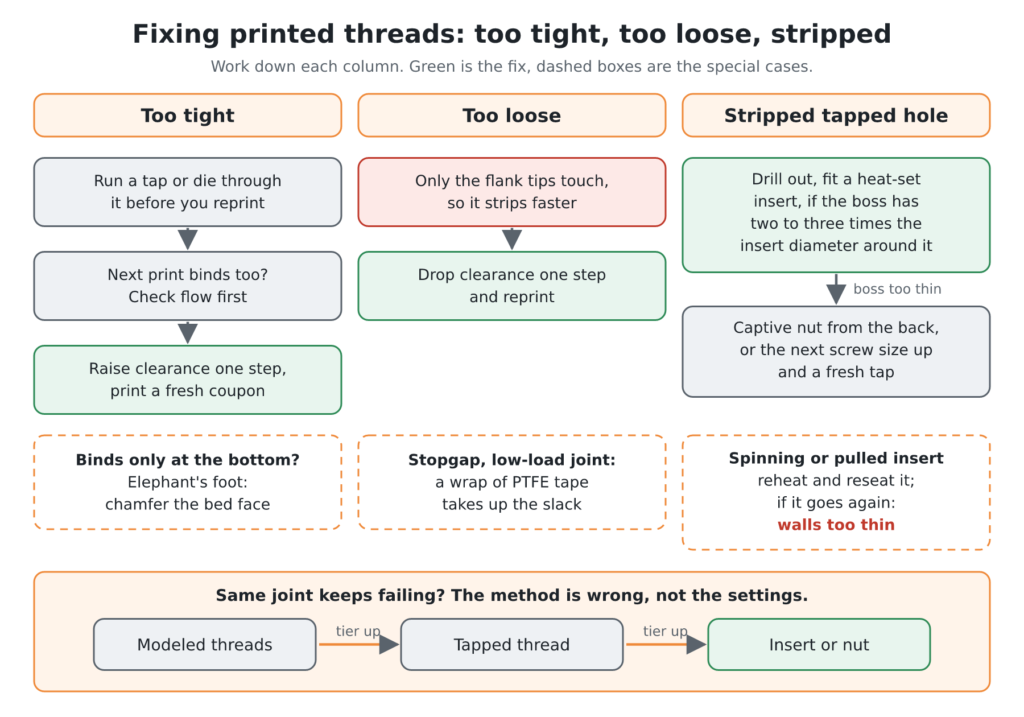
Too loose: 3D printed threads with play strip faster, because only the tips of the flanks touch. Drop the clearance one step and reprint. As a stopgap on a low-load joint, a wrap of PTFE tape takes up the slack.
Stripped tapped hole: drill it out and fit a heat-set insert, as long as the boss has the two-to-three-times diameter around it that the insert needs. If it doesn’t, the fallbacks are a captive nut from the back of the part, or the next screw size up and a fresh tap. Spinning or pulled insert: reheat and reseat it, and if it goes again, the walls around it are too thin.
If you keep losing the same joint, the method is wrong for the job, not the settings. Move it one tier up the ranking: modeled 3D printed threads to tapped, tapped to an insert or a nut. For the faults that start at the printer itself, my 3D printing problems and solutions post runs through 14 failures, each with a test and a fix.
Sources
- Protolabs, digital manufacturing provider: Mechanical Fastening Methods for Metal and Plastic Parts
- AmesWeb, engineering reference site: Metric Hex Nut Dimensions (ISO 4032)
- Nozzle Down, 3D printing tutorials: How to Model Threads and Screw Holes in Fusion 360
- Chris Bensen, maker blog: Fusion 360 – Threads Not Exported to STL
- Engineers Edge, engineering reference site: ISO Metric Tap and Drill Sizes
- McMaster-Carr, industrial hardware distributor: Heat-Set Inserts for Plastic (94459A722)
- Brassland, brass insert manufacturer: Brass Inserts for Plastics
- McMaster-Carr, industrial hardware distributor: Heat-Set Insert Kits
- Protolabs, digital manufacturing provider: Threading in 3D Printing: Heat Set and Press Fit Inserts, Tapping