 TreiD
TreiD
Based on 8 independent video reviews and manufacturer specifications. AdditiveRealm has not physically tested this printer.
Introduction
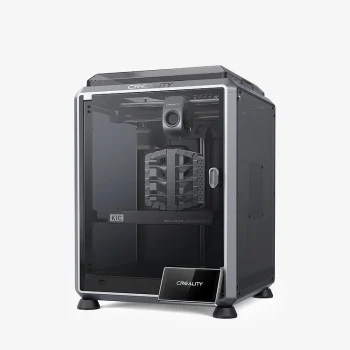
The Creality K1C is an enclosed CoreXY printer with a 220 x 220 x 250 mm build volume, a 300 °C all-metal hotend, a 100 °C heated bed, triple-Z and a rated top speed of 600 mm/s. Creality markets the ‘C’ as carbon, meaning it is built for fibre-filled filaments. Reviewers rate it a reliable, fair-value enclosed CoreXY for PLA, PETG and PLA-CF, held back by its glued wiper, single smooth PEI plate and weak app. This Creality K1C review is built on what eight reviewers found.
The K1 Creality should have launched first
Reviewers agree the K1C fixes the extruder and first-layer problems that sank the original K1, and it printed PLA, PLA-CF, PETG, CF nylon and TPU reliably for long runs.
- Printing quality8
- Ease of use8
- Build quality7
- Printing speed9
- Community support7
- Features6.5
- Reliability8.5
- Customer support5
- Pro: Hardened-steel hotend handled PLA-CF and TPU well
- Pro: Ran 24/7 production batches without trouble
- Pro: Automatic calibration, first print in about 30 min
- Con: Single smooth PEI plate with a glued-on wiper
- Con: Nozzle swap needs tools and cover removal
- Con: AI failure detection unreliable in testing
Consensus review: based on 8 independent video reviews and the maker's specs. AdditiveRealm has not physically tested this printer. How we score Affiliate disclosure
Best price: ≈ €447 $497
Where to buy ↓When the reviews were filmed, Frankly Built quoted $499 during a Mother’s Day sale on Creality’s site, and RC Girl quoted $559. As of 27 Oct 2026, the Creality US store lists the K1C at $499.00, down from $559.00, so the sale price is now the store price.
That puts it up against the Bambu Lab P1S and alongside the Creality K1, which Frankly Built priced at $429 at the time. The pitch is a closed, Bambu-style experience with open firmware and abrasive-ready hardware, though reviewers felt Bambu Lab still leads on software polish and accessories.
Several reviewers first noticed how little had changed outwardly. Frankly Built said that without the label and camera ‘you really can’t tell the difference’ from a K1. The bigger talking point was the silicone wiper brush glued to the back of the single-sided smooth PEI plate: The Next Layer and Two Moose Design said it rules out double-sided plates and ordinary aftermarket PEI sheets. Daniel Crosslink was less bothered, because the printer detects whether the brush is there.
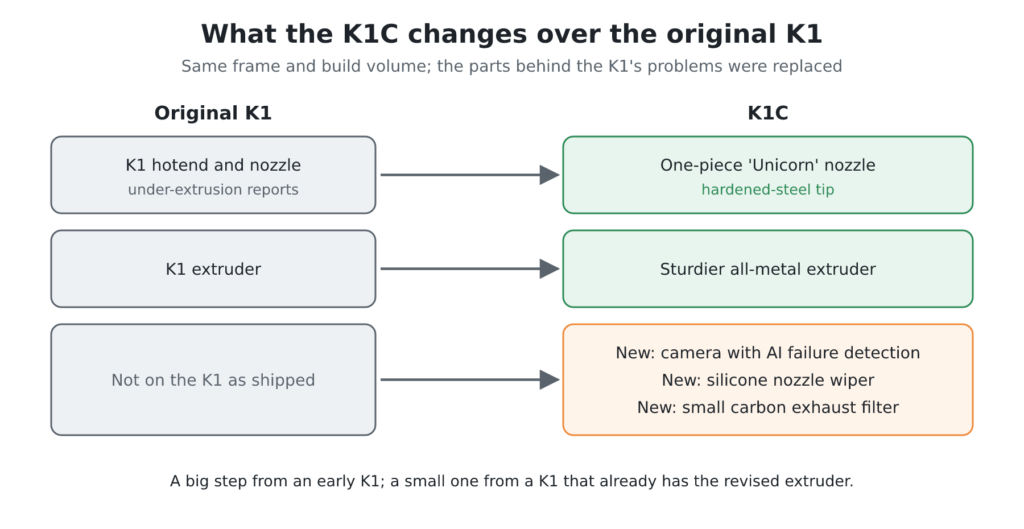
Against its predecessor, The Next Layer called the K1C Creality’s do-over of the troubled K1 launch. A one-piece ‘Unicorn’ nozzle with a hardened-steel tip and a sturdier all-metal extruder replace the K1’s hotend and extruder, and The Next Layer saw none of its under-extrusion problems. New over the K1 are a camera with AI failure detection, a silicone nozzle wiper and a small carbon exhaust filter. Frankly Built still called it ‘the same printer’ plus a camera, filter and nozzle, so I’d read it as a big step from an early K1 and a small one from a K1 with the revised extruder.
Performance breakdown
Printing Quality
Output was praised across PLA, PLA-CF, PETG, CF nylon and TPU. Daniel Crosslink printed a full set of Voron V0 parts with a perfect fit, and Frankly Built found PLA and PLA-CF prints matched in finish and tolerance, apart from the CF’s matte look. The weak spots were mostly first layers and slicer defaults. Two Moose Design saw uneven first-layer squish from a sloped bed, while Embrace Making saw stringing, melted fine details and badly placed Z seams with early slicer settings, which largely went away with Creality Print 5.1.
Score: 8/10 · On our review scoring, printing quality 8 means: Very good print quality, minimal imperfections and well-defined details. (Surface Finish: Very Good, Detail Accuracy: Very Good)
- “I think that this printer may have produced the single most beautiful TPU part I’ve ever seen” — The Next Layer
- “I love the colors and the quality print, the fitting of the parts is perfect” — Daniel Crosslink
- “first layer not the best but this side of it looks beautiful” — Two Moose Design
- “the prints are coming off a lot better now than they were at the beginning and that’s mainly due to the Creality Print 5.1” — Embrace Making
- “in terms of finish and quality they came out the same” — Frankly Built
Ease of use
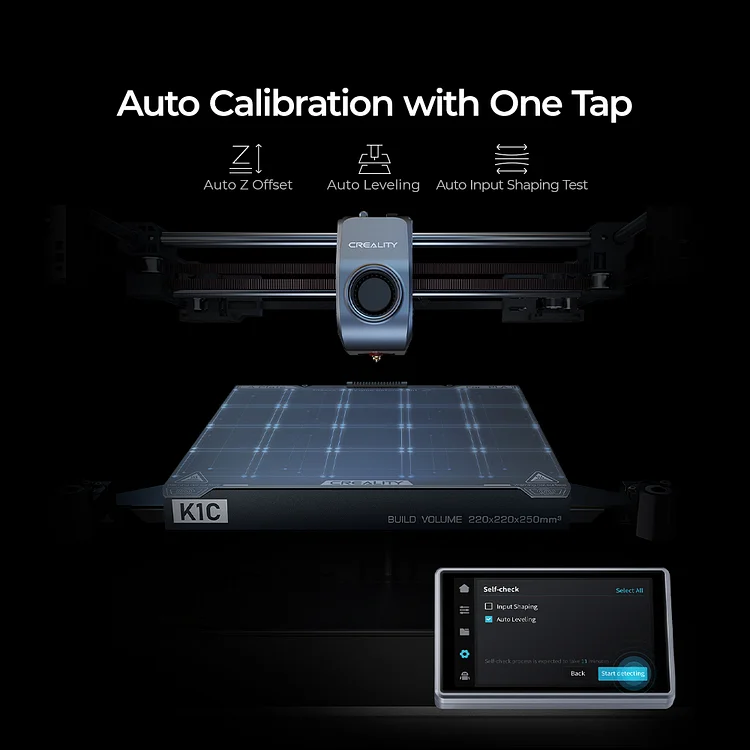
Reported setup ranged from 5 to 10 minutes of assembly (RC Girl) to about 30 minutes from box to first print (Daniel Crosslink). That includes an automatic self-check and input-shaping routine Just Vlad timed at about 11 minutes. Calibration is automatic, though Two Moose Design’s sloped bed still needed manual shimming (see Build Quality). Day to day is where the friction shows.
FauxHammer found loading filament through the rear runout sensor ‘an absolute pain’ and called the Creality Cloud phone app ‘horrible’. Both FauxHammer and Daniel Crosslink said the advertised quick-swap nozzle needs tools and the cover removed. RC Girl could only get Wi-Fi sending working from Creality Print.
Score: 8/10 · On our review scoring, ease of use 8 means: Very quick setup, minimal calibration effort. (Setup Time: 20-30 minutes, Calibration Process: Very user-friendly, User Interface: Very intuitive)
- “printer is mostly assembled for you out of the box, about a 5 to 10 minute setup time, a couple more minutes linking it to your computer and your Wi-Fi network” — RC Girl
- “in about 30 minutes we got this printer out of the box and the first print started already” — Daniel Crosslink
- “it’s going to do some checks and processes like the input shaping, things like that, and it’s going to take about 11 minutes” — Just Vlad
- “trying to get this filament through the runout sensor on the back was an absolute pain” — FauxHammer
- “Creality is announcing this as a quick swap nozzle system, honestly this isn’t exactly quick swapping” — Daniel Crosslink
Build Quality
The metal frame, rails, triple-Z and revised all-metal extruder were seen as solid, and Just Vlad described the printer as the K1 ‘refined in the right places’. Creality also changed the XY motor pulleys to tackle the K1’s vertical fine artifacts: Embrace Making described them as smaller and The Next Layer as larger, and the artifacts were gone in The Next Layer’s testing. Embrace Making and RC Girl pointed out a new rubber strip that stops the cable chain slapping the lid.
Two Moose Design found the magnetic lid only holds with two magnets and falls off. They also found the thin bed has no adjustment knobs and measured a ‘ski slope’ mesh that needs shimming. Reviewers disagreed on the glass door, and FauxHammer found the hotend fan ‘incredibly loud’. For me the bed is the part to watch.
Score: 7/10 · On our review scoring, build quality 7 means: Solid construction, durable components. (Frame Material: Solid, Component Durability: Durable, Vibration Resistance: Good)
- “it’s practically exactly the same to the original K1, it just has been refined in the right places to be reliable and a better experience” — Just Vlad
- “it does kind of look like a ski slope… I just wish Creality would give you adjustment knobs” — Two Moose Design
- “it is glass and you have to be a little careful as it doesn’t open more than that, to not push it too hard as you can crack the glass” — Just Vlad
- “the fan on the hot end is, well, it’s so incredibly loud” — FauxHammer
- Z-axis: Triple Z. Hotend type: All metal — manufacturer
Printing Speed
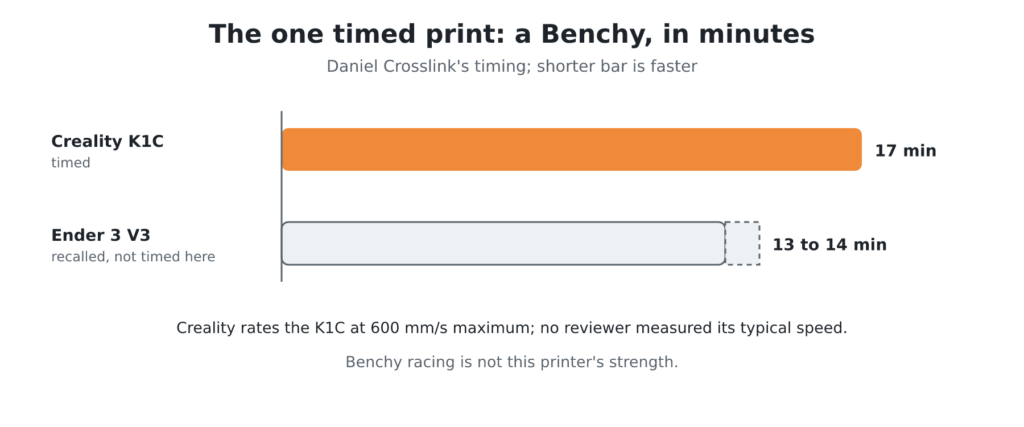
Creality rates the K1C at a maximum of 600 mm/s. No reviewer measured typical print speeds or acceleration, so real-world throughput rests on a few data points. Daniel Crosslink printed a Benchy in 17 minutes and recalled 13 to 14 minutes for the Ender 3 V3, so Benchy racing is not this printer’s strength. FauxHammer noted that quiet mode slows printing noticeably, so if you want fast and quiet together, plan for a trade-off.
Score: 9/10 · On our review scoring, printing speed 9 means: Exceptional print speed, highly efficient. (Print Speed: 300-350 mm/s, Max Speed: >350 mm/s, Default Acceleration: 1800-2000 mm/s², Max Acceleration: >3000 mm/s², Efficiency: Exceptional)
Manufacturer spec: max 600 mm/s.
⚠ Estimate: no reviewer measured print speed or acceleration, so the band’s figures are not measured here; the one timed print, Daniel Crosslink’s 17-minute Benchy, was slower than the 13 to 14 minutes recalled for the Ender 3 V3.
- Printing speed max 600 mm/s — manufacturer
- “it printed out in 17 minutes… are you in for Benchy speedboat racing, this is probably not the printer for this” — Daniel Crosslink
- “it has a quiet mode but, well, consider that as slow printing mode” — FauxHammer
Community Support
The K1 series has large owner groups on Facebook. When I checked on 27 Oct 2026, the private Creality Official K1/K1C/K1 Max/K1 SE Group had 31,078 members and 194 posts in the previous month. A second, public group, ‘CrealityK1/K1C/K1Max/K1 SE/K2 PLUS’ (created 6 Apr 2023), showed about 10K weekly visitors and 183 weekly contributions the same day. Both cover the whole K1 series, so not every member owns a K1C.
No reviewer timed forum responses, but the K1 family’s ecosystem shows up throughout the reviews. The Next Layer reports Creality published its firmware source and now allows root access from the touchscreen. Two Moose Design runs the stock K1 profile in OrcaSlicer without issues, and Embrace Making’s universal spool stand already supports the K1C.
Gaps remain at launch. Daniel Crosslink found no third-party ruby nozzles yet, and RC Girl had to build custom Cura and PrusaSlicer profiles because no K1C presets existed at the time of filming.
Score: 7/10 · On our review scoring, community support 7 means: Large active community, extensive guides. (Online Community Size: 7000-10000 users, Availability of Guides: Extensive, Responsiveness in Forums: 6-12 hours)
Measured 27 Oct 2026: Creality’s official K1-series Facebook group had 31,078 members, shared across the K1 series.
⚠ That count is above this band’s 7000-10000 users (band 9 starts above 15000); guides and forum response times were not measured, so the score is not raised on member count alone.
- “the entire K1 series now ships with the ability to gain root access right from the touchscreen” — The Next Layer
- “I run the K1 profile in Orca and it still uses this how it should” — Two Moose Design
- “I had to create a custom profile since these currently don’t have preset profiles for the K1C at the time of filming” — RC Girl
- “there is not yet any third party ruby nozzles for example for extremely abrasive materials” — Daniel Crosslink
- OpenSource: Yes. Slicer compatibility: Cura, PrusaSlicer, Simplify3D, OrcaSlicer — manufacturer
Features
Included as standard are a camera with timelapse and AI failure detection, a nozzle wiper, a carbon exhaust filter, a chamber temperature sensor, a filament runout sensor, print recovery, Wi-Fi/USB and app control, and open firmware. The build volume is 220 x 220 x 250 mm, there is no multicolour option, and the chamber is passively heated only. Creality’s US store now notes a K1C 2025 revision that it says will take its CFS multicolour unit, with launch details still to come. Reviewers found several of the standard features thin in practice.
FauxHammer said spaghetti and first-layer detection are still beta, and RC Girl’s camera did not stop spaghetti prints even at maximum sensitivity. Just Vlad doubted the small carbon filter does much. The Next Layer criticised the absence of lidar and the single smooth PEI plate.
Score: 6.5/10 · On our review scoring, features 6.5 sits between 6: Features meet industry standards, some upgrade opportunities. (Available Features: Standard, Upgrade Options: Some, Open Source: Yes, External Upgrades: Good, Build Volume: 250 x 250 x 250 mm, Multicolor Printing: Yes, App: Yes, Offline: Yes, Ventilation: Yes, Filtration: No) and 7: Advanced features, ample upgrade opportunities
Manufacturer spec: build volume 220x220x250 mm, multicolour no, enclosure yes.
⚠ The band’s example specs do not fit the K1C (220 x 220 x 250 mm, no multicolour, carbon filter); the score rests on its feature list.
⚠ Estimate: the evidence sits between two bands, so the half point is a judgement call.
- Webcam yes. Air filtration carbon only. Multicolor printing no. Max chamber temp no active heating. Printing volume 220x220x250 mm — manufacturer
- “features like spaghetti detection and first layer detection are still in beta on the K1C” — FauxHammer
- “I had a couple prints actually spaghetti… I put it most sensitive and it still didn’t stop” — RC Girl
- “it is kind of small so not sure how effective it is but it does have one and I’m sure it’s going to help a bit” — Just Vlad
- “since this printer doesn’t have lidar there’s really no good reason why it doesn’t at least include an extra textured build plate” — The Next Layer
Reliability
None of the eight reviewers logged a success rate, but the long-run reports are strongly positive. Frankly Built ran two K1Cs alongside a K1 around the clock on Etsy production with no tuning beyond first-boot calibration. The Next Layer had none of the K1’s under-extrusion problems, and Embrace Making completed a 7.5-hour support-heavy print. The exceptions were a few spaghetti failures reported by RC Girl and inconsistent first layers on Two Moose Design’s sloped bed after about 3 days 21 hours of logged time.

Score: 8.5/10 · On our review scoring, reliability 8.5 sits between 8: Very reliable, rare issues with prints. (Success Rate: 80-85%, Consistency: Highly consistent) and 9: Extremely reliable, minimal print failures
⚠ Estimate: no reviewer measured a success rate, so the score is estimated from their descriptions; the evidence sits between two bands, so the half point is a judgement call.
- “these have been printing hundreds of Flexi Rexes for me non-stop right out of the box 24/7… everything was coming out perfect” — Frankly Built
- “the K1C has had absolutely none of the under-extrusion issues that I had with the K1” — The Next Layer
- “this 7 and 1/2 hour Dragon print finished successfully” — Embrace Making
- “I had a couple prints actually spaghetti, not a ton but a little bit” — RC Girl
Customer Support
No reviewer contacted Creality support or timed a response, so I’d treat anything said about support as a cautious read, not a measured one. FauxHammer said Creality still needs to win back trust after ending support for earlier machines sooner than owners wanted, and contrasted that with Bambu Lab’s step-by-step knowledge base.
On the positive side, Frankly Built recalled Creality supplying a fix kit for owners of faulty K1 extruders. That is the one concrete example of after-sales help anywhere in these reviews.
The one timed contact I can add is my own, with a different Creality printer: when I asked about my Ender 2 Pro, the reply took about 7 days and did not solve the issue. One ticket on another machine is not a verdict on K1C support, but it is slower than the score band below assumes.
Score: 5/10 · On our review scoring, customer support 5 means: Reasonable response time, average problem resolution. (Response Time: 12-24 hours, Problem Resolution: Average)
⚠ Estimate: no reviewer measured a support response time, so the score is estimated from their descriptions. The one timed contact, my Ender 2 Pro query (a different Creality printer), took about 7 days, slower than this band’s 12-24 hours.
- “Creality still have some work to do in that regard in order to win back consumer trust, having truncated support on previous machines far sooner than many of us wish they would have” — FauxHammer
- “for a while there you could actually get a kit that they would provide” — Frankly Built
- “Creality doesn’t ship a replacement nozzle of this type with the printer yet” — Daniel Crosslink
Where reviewers disagree
- Glue on the smooth PEI plate. The Next Layer said it ‘sticks beautifully to every single material I threw at it including carbon fiber nylon without the need for any glue stick’, and RC Girl said needing glue means your settings are wrong. Daniel Crosslink said to always use glue stick on this plate so removing prints doesn’t tear the surface, and Just Vlad recommended glue to protect it.
- First layers. The Next Layer reported ‘perfect every single time’, while Two Moose Design measured a ‘ski slope’ bed mesh, saw uneven squish, and wants manual shims or adjustment knobs.
- The glass door. Two Moose Design said Creality ‘fixed the door’ so it won’t shatter. Just Vlad and Frankly Built still warned that over-opening it can crack the glass.
- Setup time. Reviewers found setup quick, but FauxHammer dismissed Creality’s ‘3 minutes to power-on’ claim outright.
- How much changed from the K1. The Next Layer described an aggressive redesign of the K1’s problem parts. Frankly Built called it ‘the same printer’ with a camera, filter and new nozzle, and FauxHammer said it ‘isn’t a massive upgrade’.
- The carbon-fibre pitch. Frankly Built and Daniel Crosslink printed PLA-CF without trouble, and The Next Layer printed CF nylon. The Next Layer and FauxHammer both read the single PLA-labelled smooth PEI plate as a sign that ‘carbon’ is largely marketing, and Two Moose Design asked the same question. The maker’s material list in our database (ABS, ASA, HIPS, PETG, PLA, PVA/BVOH, PVB, TPU, flexible) has no CF composites, nylon or PC, yet Frankly Built read PA, PC, PLA-CF and PA-CF off Creality’s own product pages for both the K1 and K1C, so I’d confirm the supported materials with Creality before buying it for fibre-filled filament.
Sum up
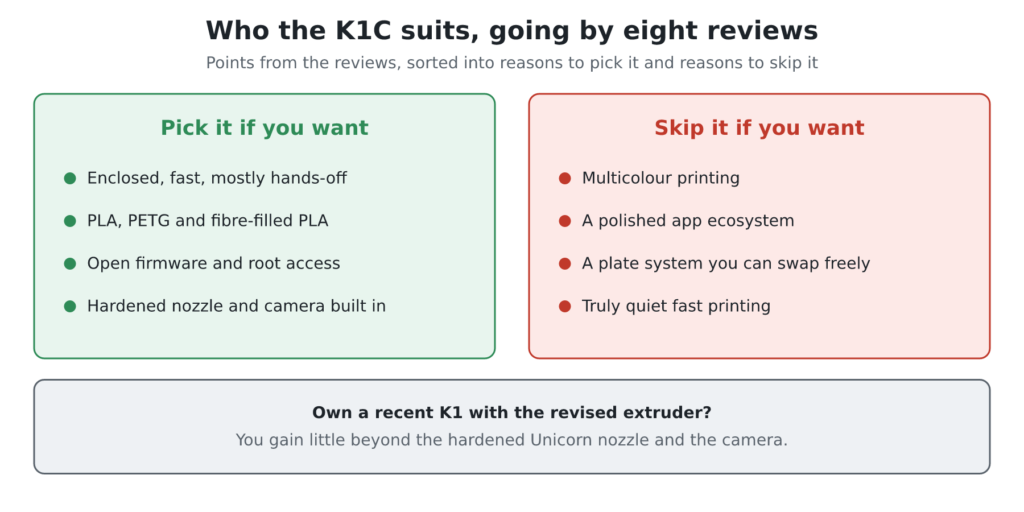
Going by these eight reviews, I’d point the K1C at makers who want an enclosed, fast, mostly hands-off printer for PLA, PETG and fibre-filled PLA, and who value open firmware and root access. Frankly Built’s Etsy production and Daniel Crosslink’s Voron parts are the kind of work reviewers saw it handle well. I’d skip it if you want multicolour, a polished app ecosystem, or a plate system you can swap freely, or if you need truly quiet fast printing. Owners of a recent K1 with the revised extruder gain little beyond the hardened Unicorn nozzle and the camera, which Frankly Built added to a K1 for $25.
At $499.00 on Creality’s US store (checked 27 Oct 2026), I think it is fair value for a hardened-nozzle, camera-equipped enclosed CoreXY. Plan for spare Unicorn nozzles, which the same store lists as a kit at $36.85 on that date (Daniel Crosslink found only a $40–50 set at review time), and consider a textured build plate, because neither ships in the box. You can compare that price with rivals on the Comparison chart.
Against the Bambu Lab P1S, which you can line up beside the K1C in Compare 3D Printers, FauxHammer’s answer to ‘is it a better pick?’ was a flat ‘no’, citing Bambu’s tighter software and knowledge base. The Next Layer framed the K1C as the open-firmware alternative Bambu won’t offer. On speed, the only comparison is Daniel Crosslink’s 17-minute Benchy against the 13 to 14 minutes recalled for the Ender 3 V3. So for me the K1C’s case rests on its enclosure and abrasive-ready hotend rather than raw speed.
Videos
Where to buy it
All three AliExpress listings sell the K1C 2025 revision, not the original K1C the reviewers filmed; the GEEK 3D Store listing says it ships with a clog-free extruder kit. The last Creality listing also sells the K1 and K1 Max, so check that the K1C 2025 option is selected. Creality’s US store lists the K1C at $499.00 (checked 27 Oct 2026).
Price alert
Sources
- The Next Layer — The Creality K1C: A Better Pick Than The Bambu Lab P1S?!
- Frankly Built — Creality K1 vs K1C | Which 3D Printer is Worth your Money!?
- Just Vlad — Creality K1C – CF 3D Printer – Unbox & Setup
- Daniel Crosslink — Creality K1C Review, Important Upgrades & Mods
- Two Moose Design — Creality K1C 100 Hour review
- RC Girl — Creality’s Flagship K1C 3D Printer: Game Changer?!
- FauxHammer — Creality K1C Review – Missing the Point
- Embrace Making — Creality K1C Long Term Review, Guide, Upgrades, PETG, Creality Print 5.1 and More!
- Creality US Store — K1C 3D Printer
- Facebook — Creality Official K1/K1C/K1 Max/K1 SE Group (About page)