 TreiD
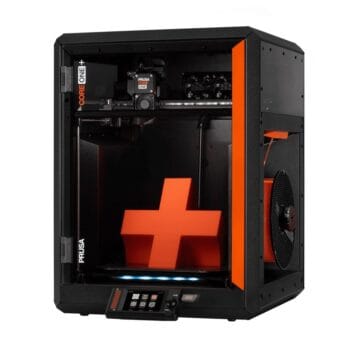
Based on 4 independent video reviews and manufacturer specifications. AdditiveRealm has not physically tested this printer.
Introduction
The Prusa Core One is Prusa Research’s first factory-enclosed CoreXY printer, and the four reviewers behind this Prusa Core One review rate it highly. Everything here comes from their findings and Prusa’s own pages. Made with Layers found its print quality matched the Bambu Lab X1C’s, and the printer needs very little intervention. The catches are a premium price, a weak optional camera, single-use panel rivets and MMU3 multicolour that has to print a prime tower.
Prusa reliability, finally in an enclosed CoreXY
Reviewers found the Core One prints on a par with the Bambu Lab X1C and runs with very little intervention.
- Printing quality8.5
- Ease of use9
- Build quality8
- Printing speed9
- Community support8.5
- Features7.5
- Reliability9
- Customer support6.5
- Pro: Load cell probing gives hands-off first layers
- Pro: Print quality close to the Bambu Lab X1C in testing
- Pro: Solid all-steel frame in a compact footprint
- Con: Optional camera is snapshot-only and cloud-only
- Con: Hardened nozzle for abrasives costs extra
- Con: Clear panels scratch and use single-use rivets
Consensus review: based on 4 independent video reviews and the maker's specs. AdditiveRealm has not physically tested this printer. How we score Affiliate disclosure
What’s new over the MK4S is the motion system and the box around it. The Nextruder toolhead, load-cell nozzle probing, bed and electronics carry over into an all-steel exoskeleton, now with a linear-rail X axis, 10 mm Y rods, 0.9° stepper motors, three Z lead screws on their own motors, two rear exhaust fans and an adjustable top vent. Prusa’s launch post gives a build volume of 250 × 220 × 270 mm and a chamber that reaches 55 ℃. Prusa has since replaced it in its shop with the Core One+, covered under Sum up.
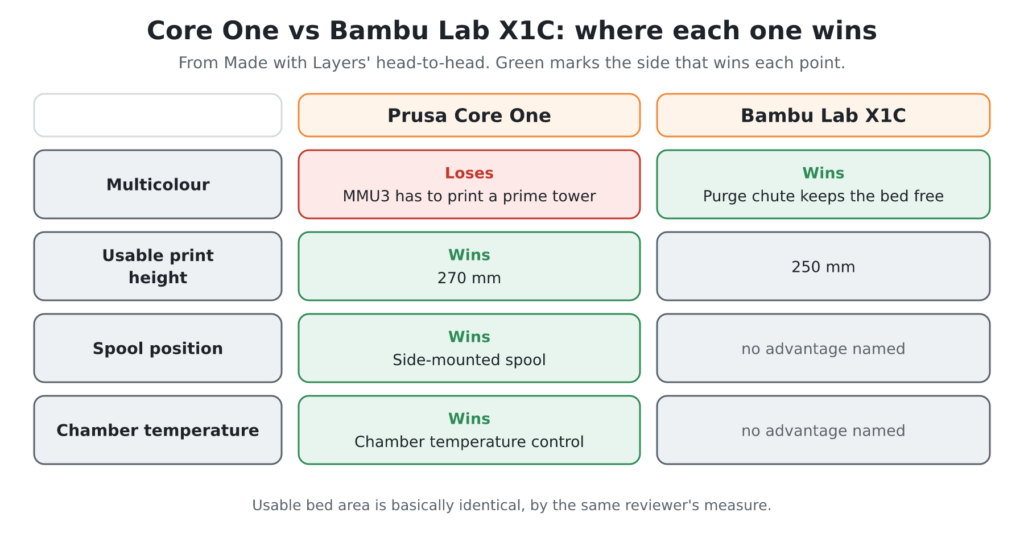
It’s aimed squarely at the Bambu Lab X1C. Made with Layers compared the two head to head and found Prusa trying to ‘one-up’ Bambu on print height and spool placement, and judged its chamber temperature control significantly better. YGK3D argued that Bambu’s firmware authorisation update and US tariff price rises handed Prusa an opening.
Performance breakdown
Printing Quality
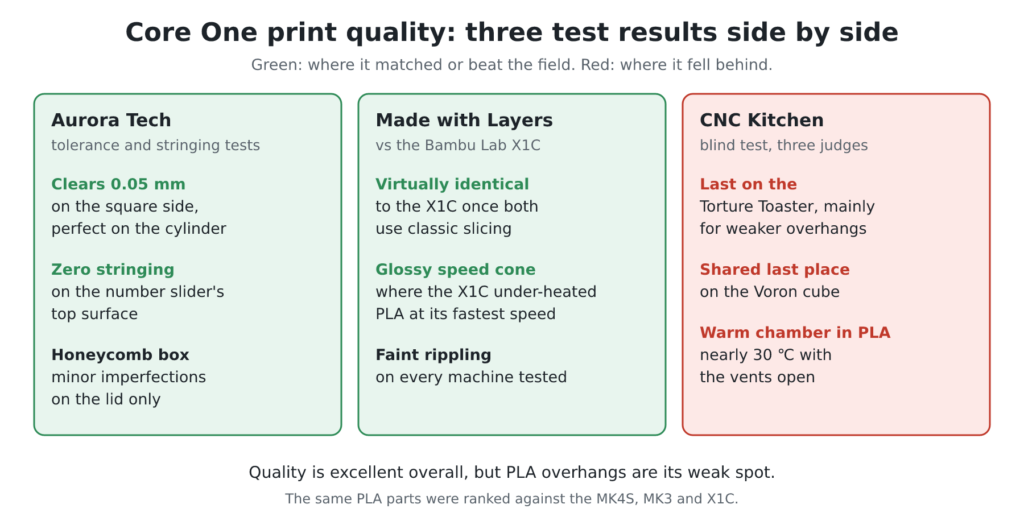
Aurora Tech‘s tolerance test cleared at 0.05 mm on the square side and reached perfect clearance on the cylinder side. Its number slider’s top surface printed with zero stringing, and its honeycomb box showed only minor imperfections on the lid. CNC Kitchen‘s default-profile Benchy came out with hardly any artifacts.
Made with Layers found Core One output virtually identical to the X1C’s once both used classic slicing, with only faint surface rippling on every machine. It also printed a speed-graded cone consistently glossy, where the X1C under-heated the PLA at its fastest speed. YGK3D cautioned that the settings behind Prusa’s 70° overhang claim are a little cherry-picked.
CNC Kitchen’s blind test was less flattering. Three judges ranked the same PLA parts from the Core One, MK4S, MK3 and X1C: the Core One came last on the Torture Toaster, mainly for weaker overhangs, and shared last place on the Voron cube. Every Core One print showed a slightly rough surface and tiny layer inconsistencies up close, and CNC Kitchen blames the overhangs on a warm chamber that rose to nearly 30 ℃ in PLA mode with the vents open. Quality is excellent overall, but PLA overhangs are its weak spot.
Score: 8.5/10 · On our review scoring, printing quality 8.5 sits between 8: Very good print quality, minimal imperfections and well-defined details. (Surface Finish: Very Good, Detail Accuracy: Very Good) and 9: Excellent print quality, high precision, and smooth surfaces
⚠ Estimate: the evidence sits between two bands, so the half point is a judgement call.
- “On the square side, it clears up to 0.05 mm and gets stuck at zero clearance, which is a perfect score. On the cylinder side, it also achieves perfect clearance.” — Aurora Tech
- “The Benchy came out looking great with hardly any artifacts at first sight.” — CNC Kitchen
- “If you look real close, all of the machines have the smallest amount of surface rippling, just in different spots, and none of them are really an issue.” — Made with Layers
- “It prints well, but the settings are a little cherrypicked.” — YGK3D
- “All my CORE One prints had a slightly rough surface and some tiny layer inconsistencies.” — CNC Kitchen
- Printing resolution 0.05-0.30 mm — manufacturer
Ease of use
The assembled version needs only the screen fitted, which CNC Kitchen found a bit fiddly because of the ribbon cable, and the printer was then ready after about 10 minutes of guided self-tests. Aurora Tech found signs the machine had been factory tested before shipping. Load-cell probing sets the Z offset automatically and probes only the print area, so no reviewer calibrated manually. Network setup is a quick NFC tap from the Prusa app, and reviewers praised how fast it is.

The complaints concern interface details. YGK3D found the touchscreen small enough to prefer the rotary knob, and CNC Kitchen wanted a position indicator on the top vent, which the Core One+ now opens and closes by itself. Kit buyers should budget for a much longer build: Made with Layers guessed under a day for someone who has never built a printer.
Score: 9/10 · On our review scoring, ease of use 9 means: Extremely easy setup, intuitive interface, no calibration issues. (Setup Time: <20 minutes, Calibration Process: No issues, User Interface: Very intuitive)
- “After about 10 minutes the Core One is ready for printing.” — CNC Kitchen
- “This is a touch screen, but you’ll probably prefer just to use the rotary knob, especially if you have big fingers.” — YGK3D
- Automatic bed leveling with bed leveling sensor — manufacturer
Build Quality
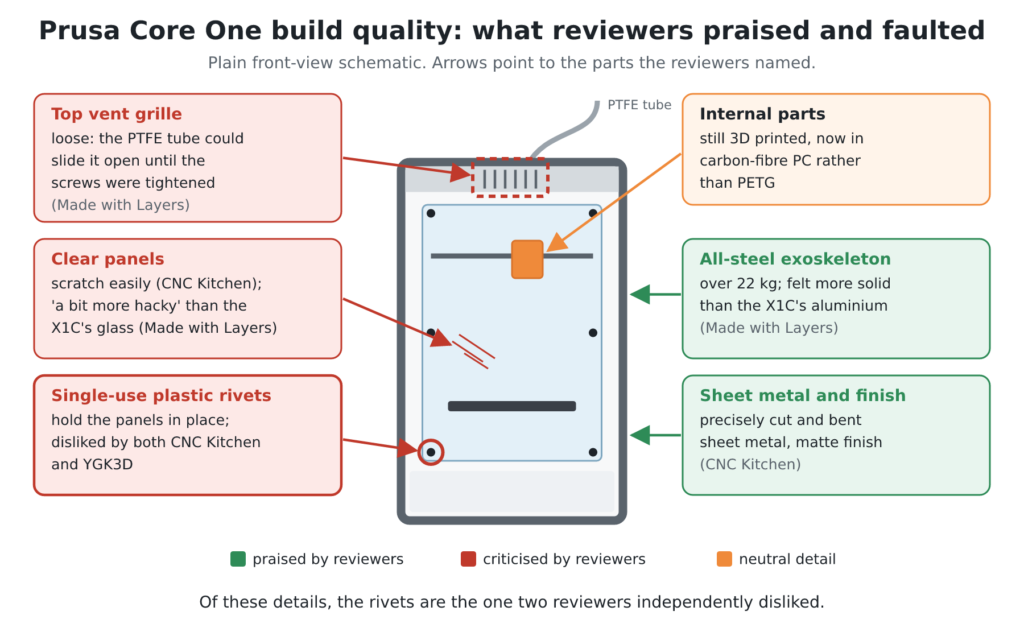
Reviewers describe an all-steel exoskeleton weighing over 22 kg. CNC Kitchen praised the precisely cut and bent sheet metal and the matte finish. Made with Layers said the steel feels more solid than the X1C’s aluminium, but called the clear panels ‘a bit more hacky’ than the X1C’s glass.
CNC Kitchen warned the panels scratch easily, and both CNC Kitchen and YGK3D disliked the single-use plastic rivets that hold them. Made with Layers also found the top vent grille loose enough for the PTFE tube to slide it open until the screws were tightened. Internal parts remain 3D printed, now in carbon-fibre PC rather than PETG. Of these details, the rivets are the one two reviewers independently disliked.
Score: 8/10 · On our review scoring, build quality 8 means: Very solid build, highly durable materials and low vibration. (Frame Material: Very Good, Component Durability: Very Durable, Vibration Resistance: Very Good)
- “It doesn’t look cheap at all, featuring precise gaps and a really nice matte finish.” — CNC Kitchen
- “All the see-through panels appear to be acrylic, so you should be careful when cleaning them as they will scratch easily.” — CNC Kitchen
- “The steel feels more solid but the polycarbonate feels a bit more hacky.” — Made with Layers
- “These are generally meant to be one-time use, which means they might need to be replaced if they’re ever removed during disassembly of the printer for maintenance, but they do send you with plenty of extras.” — YGK3D
Printing Speed
Treat the rated figures as ceilings: the spec sheet lists up to 800 mm/s and 15,000 mm/s² acceleration, but no reviewer measured typical print speeds, so this section leans on job times. CNC Kitchen’s default-profile Benchy took 37 minutes, and Aurora Tech’s took 42 minutes, matching the slicer estimate. Aurora Tech’s number slider finished in 2 h 30 min, the faster end of the 2 h 30 min to 3 h it sees from current machines.
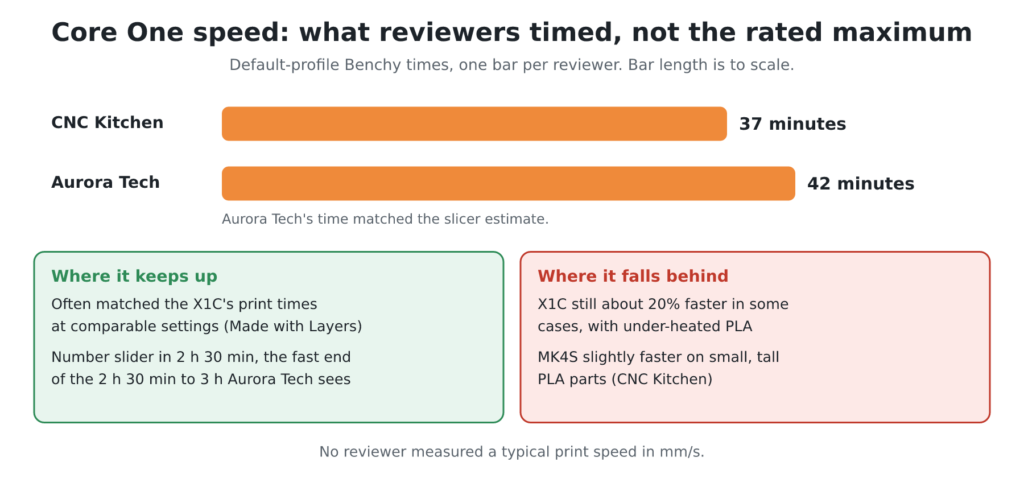
Made with Layers found the Core One often matched the X1C’s print times at comparable settings, though the X1C was still about 20% faster in some cases, at the cost of under-heated PLA. Prusa’s launch post promises print times 15 to 20% shorter than the MK4S, but CNC Kitchen found the MK4S slightly faster on small, tall PLA parts. The enclosed Core One slows down sooner to respect minimum layer times, so its CoreXY speed only pays off on bigger parts.
Score: 9/10 · On our review scoring, printing speed 9 means: Exceptional print speed, highly efficient. (Print Speed: 300-350 mm/s, Max Speed: >350 mm/s, Default Acceleration: 1800-2000 mm/s², Max Acceleration: >3000 mm/s², Efficiency: Exceptional)
Manufacturer spec: max 800 mm/s, 15,000 mm/s².
⚠ Estimate: no reviewer measured a typical print speed or acceleration, so the score rests on the rated maximums and the job times reviewers recorded.
- Printing speed max 800 mm/s, acceleration 15,000 mm/s² — manufacturer
- “With comparable settings the Core One often lands on exactly the same print times as the X1C. In some cases the Bambu machine is still about 20% faster, but it does so at the expense of temperature control.” — Made with Layers
- “The Benchy with default settings took 37 minutes to finish.” — CNC Kitchen
- “The total printing time for the Benchy is 42 minutes, which matches the slicer’s estimate.” — Aurora Tech
Community Support
I counted the Core One’s own channels on 7 Nov 2026, and Facebook and Prusa’s forum carry most of the activity. The largest, the Prusa Core One Users Facebook group, has 5.9K members, against 383 in the smaller Prusa CORE ONE group. r/PrusaCoreOne, created on 27 Jan 2025, is quiet, at about 132 weekly visitors. Most of the detail sits in Prusa’s own Core One forum, with about 2,400 topics and nearly 28,000 posts across its general, assembly, hardware and printing-help boards.
The brand-wide channels add far more reach. The official Prusa Discord had 13,449 members, 2,828 of them online, and r/prusa3d showed 66K weekly visitors and 4.9K weekly contributions. Neither is Core One-only, but Core One threads were among the newest posts on r/prusa3d. Nobody has published a forum response time, so that part of the score is still an estimate.
On the hardware side, CNC Kitchen highlights that the Core One shares the MK3/MK4 build-plate format, which Prusa’s launch post confirms, so an established range of sheets already fits. CNC Kitchen also notes the empty side pocket is there for printable mods, and Made with Layers printed a holder for the rear fans that takes IKEA particle filters. Aurora Tech lists Prusa-made add-ons including a GPIO board and an accelerometer, and CNC Kitchen notes an MK4S-to-Core One upgrade kit.
Score: 8.5/10 · On our review scoring, community support 8.5 sits between 8: Very large and active community, quick responses and many resources. (Online Community Size: 10000-15000 users, Availability of Guides: Very Extensive, Responsiveness in Forums: 6 hours) and 9: Massive community, comprehensive resources and quick support
Counted 7 Nov 2026: Prusa Discord 13,449 members, r/prusa3d 66K weekly visitors, Core One Facebook groups 5.9K and 383 members.
⚠ Estimate: community size is counted (the largest member count, 13,449, fits band 8 on its own); guide quality and forum response time are estimated from reviewers; the evidence sits between two bands, so the half point is a judgement call.
- “The Core One still utilizes the same build plates, which is great because there’s already a large ecosystem with various types for all applications.” — CNC Kitchen
- “The other side pocket gives you space to mount your equipment with printable mods.” — CNC Kitchen
Features
The Core One combines an enclosure, two rear exhaust fans and an adjustable top vent with Wi-Fi, Ethernet, NFC setup, USB printing and Prusa Connect. Optional extras include a camera, filtration, a GPIO board, an accelerometer and MMU3 multicolour.
Made with Layers praised automatic chamber preheating for ABS and fully local, account-free use. YGK3D found the optional camera takes snapshots only, needs partial disassembly to fit and is reachable only through cloud-based Prusa Connect, with local PrusaLink still in beta. CNC Kitchen saw that feed refresh once every 10 seconds.
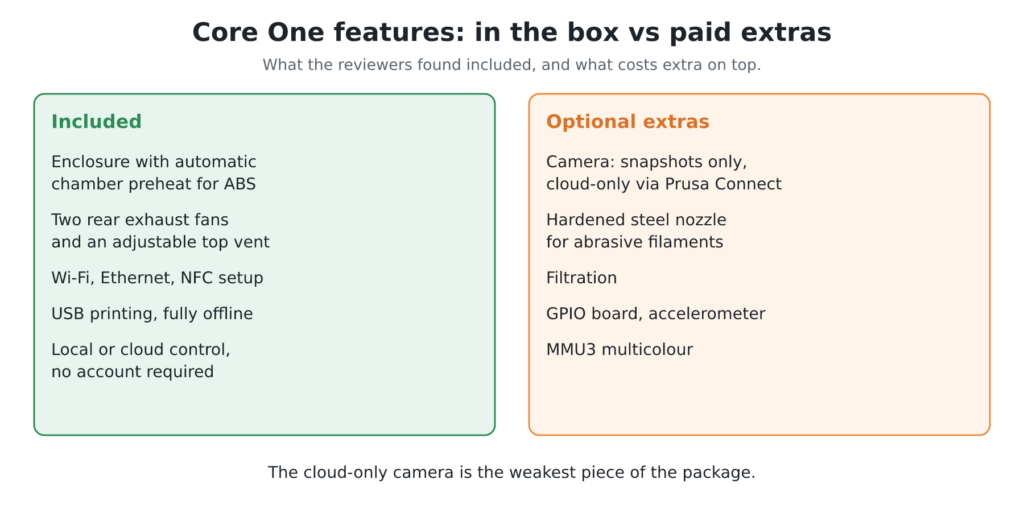
YGK3D also objected to paying extra for a hardened steel nozzle for abrasive filaments, and CNC Kitchen would rather have had one fitted as standard. The 250 × 220 mm bed is modest next to the Prusa Core One L‘s 300 × 300 × 330 mm. Of everything on this list, the cloud-only camera is the weakest piece.
Score: 7.5/10 · On our review scoring, features 7.5 sits between 7: Advanced features, ample upgrade opportunities. (Available Features: Advanced, Upgrade Options: Ample, Open Source: Yes, External Upgrades: Extensive, Build Volume: 300 x 300 x 300 mm, Multicolor Printing: Yes, App: Yes, Offline: Yes, Ventilation: Yes, Filtration: Yes) and 8: Very advanced features, excellent upgrade opportunities
Manufacturer spec: build volume 250 × 220 × 270 mm, multicolour optional, enclosure yes.
⚠ Estimate: the evidence sits between two bands, so the half point is a judgement call.
- “You can of course use the networking features on the local network only without going through their cloud service or requiring an account, or skip connecting it to a network entirely. It will happily print from a USB drive just the same.” — Made with Layers
- “Why then is the camera feed not accessible through the LAN-based PrusaLink?” — YGK3D
- “The Core One is also compatible with the MMU3 that allows you to print with up to five colors, but it seems the kit for Core One is not released yet for now.” — Aurora Tech
- Multicolor printing optional, air filtration HEPA + Carbon, max chamber temperature 55 ℃, open source — manufacturer
Reliability
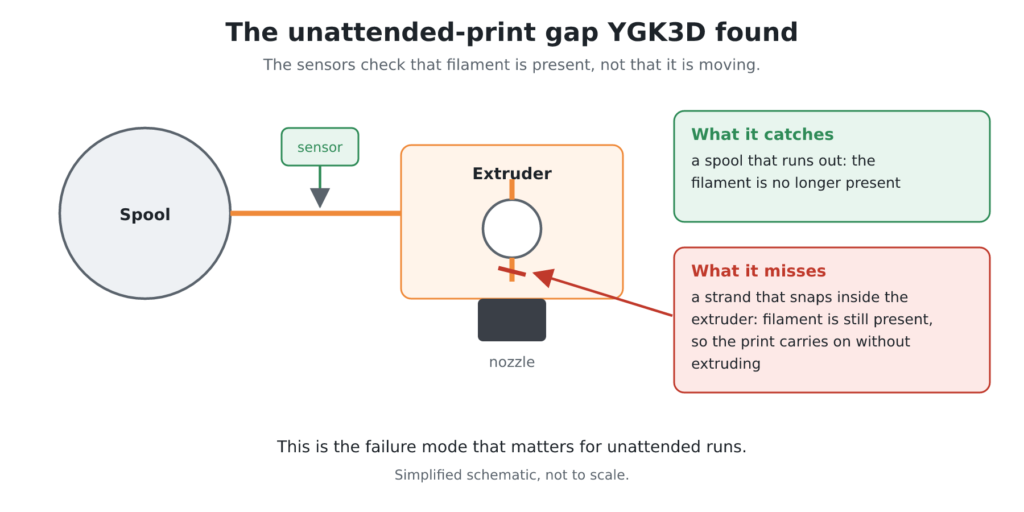
Made with Layers reported a week of what it called basically flawless prints, mostly started remotely and checked only on completion. It also found load-cell levelling as consistent as ever, though no reviewer published a success rate for the standard Core One. YGK3D flagged one failure mode that matters for unattended runs: the Nextruder senses filament presence but not movement, so a strand that snaps in the extruder lets the print carry on without extruding. CNC Kitchen added that the launch felt a little rushed and needed polish through firmware and slicer updates.
Score: 9/10 · On our review scoring, reliability 9 means: Extremely reliable, minimal print failures. (Success Rate: 85-90%, Consistency: Highly consistent)
⚠ Estimate: no reviewer measured a success rate, so the score is estimated from their descriptions.
- “Reliability has also been great. I started most of my prints remotely through Prusa Connect straight from the slicer.” — Made with Layers
- “If the filament is broken at this point, the printer will be none the wiser. It will just keep printing but not extruding, which is definitely frustrating.” — YGK3D
Customer Support
Prusa’s published support channels cover more ground than any reviewer did. Prusa’s customer support page promises full 24/7 English live chat, even for printers out of warranty or bought from a third party. Prusa’s warranty terms give consumers in the EU, Norway, Iceland, Liechtenstein and Switzerland two years, while EU businesses get one year. No reviewer timed a reply or went through retail support, though.
CNC Kitchen’s first review unit was damaged by the courier and Prusa replaced it swiftly, but press handling isn’t a reliable guide to what buyers receive.
I’d hold that live chat to a simple bar. The one support ticket I opened with Bambu for my P1S, through the app, took about 24 to 27 hours to get a reply. A real person on chat around the clock should beat that comfortably, and it’s worth testing before your warranty clock starts running.
Score: 6.5/10 · On our review scoring, customer support 6.5 sits between 6: Prompt response, good problem resolution. (Response Time: 12 hours, Problem Resolution: Good) and 7: Quick response, effective problem-solving
⚠ Estimate: no reviewer measured a support response time, so the score is estimated from their descriptions; the evidence sits between two bands, so the half point is a judgement call.
- “The courier heavily mistreated the initial review unit that I got and Prusa swiftly replaced it with a new one.” — CNC Kitchen
- 24/7 English live chat; 2-year warranty for consumers in the EU, Norway, Iceland, Liechtenstein and Switzerland — manufacturer
Where reviewers disagree
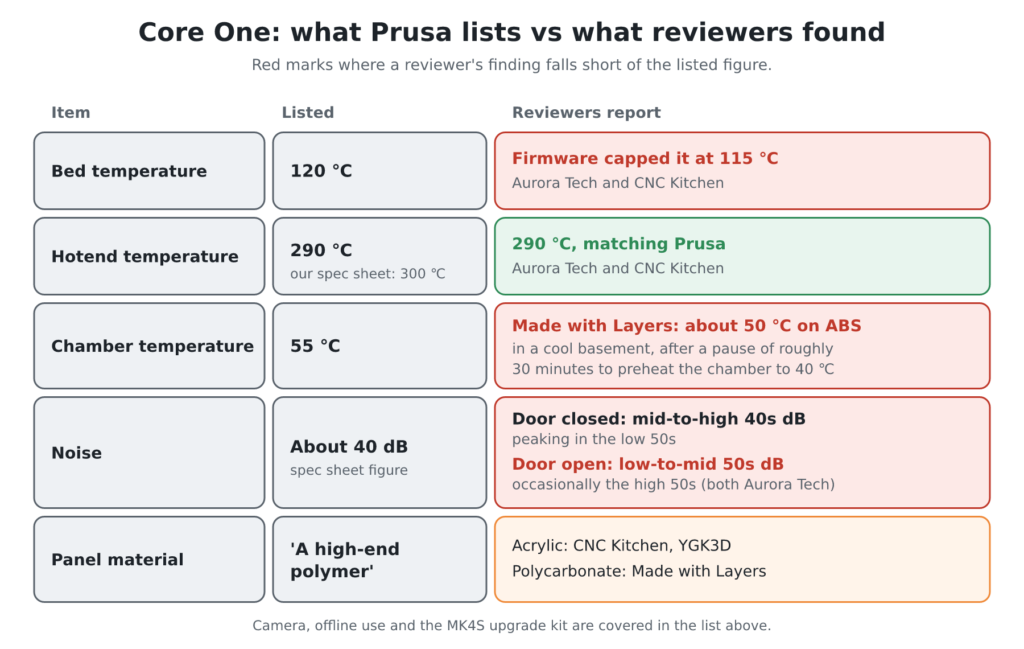
- Bed temperature: Prusa rates the heated bed at 120 ℃, but Aurora Tech and CNC Kitchen both found the shipping firmware capped it at 115 ℃.
- Hotend temperature: our spec sheet lists 300 ℃, but Prusa’s own pages, Aurora Tech and CNC Kitchen all give 290 ℃, so plan around 290 ℃.
- Chamber temperature: Prusa lists a 55 ℃ maximum. Made with Layers measured about 50 ℃ during an ABS print in a cool basement, after the printer paused for roughly 30 minutes to preheat the chamber to 40 ℃. Aurora Tech repeats the 55 ℃ figure.
- Noise: the spec sheet lists about 40 dB. Aurora Tech measured the mid-to-high 40s dB with the door closed, peaking in the low 50s, and the low-to-mid 50s with the door open, occasionally reaching the high 50s. CNC Kitchen also found motor noise noticeable at speed.
- Camera fitting: Made with Layers and CNC Kitchen describe a full HD camera that snaps in with magnets. YGK3D says fitting it requires partial disassembly, and both YGK3D and CNC Kitchen found it only works through cloud-based Prusa Connect.
- Offline use: Made with Layers praised fully local, account-free networking and USB printing. YGK3D argued the cloud-only camera and the still-beta local PrusaLink undercut Prusa’s offline promise.
- Panel material: Prusa’s launch post says only ‘a high-end polymer’. CNC Kitchen and YGK3D describe the clear panels as acrylic, while Made with Layers calls them polycarbonate.
- MK4S upgrade kit: CNC Kitchen presents it as a way to convert an MK4S into a full Core One. Made with Layers thinks that, at almost half the price of a Core One kit, selling the MK4S and buying new makes more sense.
- Market timing: CNC Kitchen asked whether the Core One is ‘too little, too late’, and YGK3D said Prusa may have ‘missed the boat’. YGK3D also argued Bambu’s firmware lockdown and tariff price rises gave Prusa a fresh opening.
Sum up
The Core One suits buyers who want consistent, unattended printing and an enclosed machine for ABS, ASA or PC. Made with Layers found the automatic chamber preheat makes those materials easy again. It also suits people who want wired, local or fully offline control, and MK4S owners who can upgrade rather than replace.
The status LED strip, Ethernet and Prusa Connect make it farm-friendly, as CNC Kitchen notes. Skip it if you need a larger bed (consider the Core One L), want multicolour without a prime tower, or want a camera that works without the cloud.
Whether bought assembled or as a kit, reviewers judged the Core One a premium-priced printer whose quality and reliability justify much of the cost. Prusa launched the assembled printer at $1,199 before tax, and the add-ons noted under Features come on top of that before comparing it with anything else.
On 3 Nov 2026 Prusa’s shop sells only its successor, the Core One+, at €1,349 assembled or €1,049 as a kit, with US prices from $1,299. A Core One can be brought up to the + with Prusa’s $10 upgrade kit or by printing the upgrade parts yourself.
Compared with the Bambu Lab X1C, the verdict splits cleanly. The X1C wins on multicolour, because its purge chute keeps the bed free while the MMU3 has to print a prime tower. The Core One wins on height (270 mm against the X1C’s usable 250 mm, by Made with Layers’ measure, with usable bed area basically identical), the side-mounted spool and chamber temperature control.
Against the MK4S and the i3 MK3S+ before it, the Core One turns the Prusa MK4 family’s bed-slinger layout into CoreXY. CNC Kitchen cites about 30% more volume than the MK series, and the printed internal parts switch from PETG to carbon-fibre PC. Made with Layers advises against the MK4S upgrade kit: at almost half the price of a Core One kit, selling the MK4S and buying new makes more sense. The kit still suits owners who want to reuse a toolhead, bed and electronics they already paid for and don’t mind stripping and rebuilding.
Videos
Where to buy it
Prusa no longer sells the original Core One new. Its official shop lists the successor, the Prusa CORE One+ (Gen 2), at €1,349 assembled or €1,049 as a kit, with US prices from $1,299 (checked on Prusa’s shop, 3 Nov 2026). We found no listing of the complete original Core One on AliExpress or Amazon (checked 2026-11-03).
Sources
- Aurora Tech — Prusa Core One In-Depth Review: The Most Reliable Future-Proof CoreXY Printer
- CNC Kitchen — Prusa CORE One Hands-On: Prusa’s Redemption?
- Made with Layers (Thomas Sanladerer) — Finally, Prusa takes on Bambu! CORE One review (and X1C comparison)
- YGK3D — Trouble in Prusa-dise – Core One Honest Review
- Prusa Research blog — Introducing Prusa CORE One: Our new fully-enclosed CoreXY 3D printer with active chamber temperature control
- Prusa Research shop — Prusa CORE One+ (Gen 2)
- Facebook — Prusa Core One Users ⚙️ (public group)
- Facebook — Prusa CORE ONE (public group)
- Reddit — r/PrusaCoreOne
- Reddit — r/prusa3d
- Discord — prusa3d server invite
- Prusa Forum — Prusa CORE One / One+ / One+ (Gen 2)
- Prusa Knowledge Base — Customer support
- Prusa Knowledge Base — Warranty