 TreiD
Based on 8 independent video reviews and manufacturer specifications. AdditiveRealm has not physically tested this printer.
Introduction
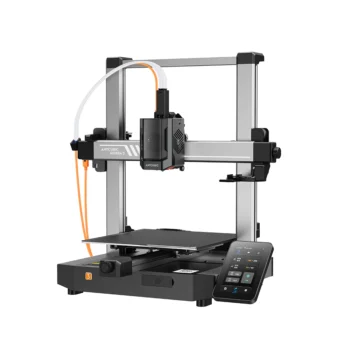
The Anycubic Kobra 3 is a fast Cartesian bed slinger with a 250 × 250 × 260 mm build volume, a direct-drive all-metal hotend rated to 300 °C, a 110 °C heated bed and a double-sided textured PEI spring-steel sheet. Reviewers describe a strain-gauge sensor in the print head that levels the bed and sets the Z offset automatically, plus input shaping and pressure advance on Anycubic’s Klipper-derived firmware. AdditiveRealm has not physically tested this printer, so this Anycubic Kobra 3 review is built from what eight reviewers found.
The short version of their verdict: it is fast and close to ready out of the box, and Aurora Tech got a perfect tolerance score and one of the best retraction results it has seen. The catch is surface finish, which trails the Bambu Lab A1, so you are trading finish for speed.
Budget multicolor that finally rivals Bambu
Reviewers found the Kobra 3 combo fast, easy to set up and capable of good results with normal profiles.
- Printing quality7
- Ease of use7
- Build quality6
- Printing speed9
- Community support8
- Features7
- Reliability8
- Customer support5
- Pro: ACE Pro adds four-color printing and filament drying
- Pro: Fast prints with near-perfect tolerance results
- Pro: Mostly pre-assembled with automated calibration
- Con: High purge waste, even between same-color prints
- Con: Fast presets visibly sacrifice surface quality
- Con: Front ACE cable and side unit eat desk space
Consensus review: based on 8 independent video reviews and the maker's specs. AdditiveRealm has not physically tested this printer. How we score Affiliate disclosure
Best price: ≈ €267 $292
Where to buy ↓The main selling point is the optional ACE Pro (Anycubic Color Engine). This enclosed four-spool unit handles multicolor printing, filament backup and RFID color detection, and it also works as a filament dryer. Anycubic announced that two units can be chained for eight colors, but that setup was not yet available when these reviews were made.
This review covers only the original Kobra 3; if you are looking at the revised model, see the Anycubic Kobra 3 V2 page.
Aurora Tech reported a launch price of $339 for the printer alone and $110 more for the combo with the ACE Pro. Micro Center quoted the combo at $549, with $449 early-bird pricing. These are launch prices from the time of the reviews.
Reviewers place it directly against the Bambu Lab A1 combo as an open-frame, high-speed bed slinger with a four-spool multicolor system. The target buyer is a beginner or hobbyist who wants multicolor printing on a budget.
First impressions were mostly about how little building it needs. FauxHammer said ‘90% of it was built out of the box’, and Dave Tries This had it set up in about 20 minutes, plus a few more to connect the ACE Pro. The pre-loaded fast Benchy divided opinion straight away.
Reviewers also noted small assembly niggles. My Tech Fun had to tighten loose eccentric nuts on the Y axis. My Tech Fun, M.M’s Prop Shop, FauxHammer and Dave Tries This all disliked the ACE Pro cable plugging into the front of the printer, and FauxHammer plugged it into the wrong port at first. M.M’s Prop Shop and Dave Tries This both found the PTFE tubes extremely long, and M.M’s Prop Shop had to remove clips from the ACE Pro before the tubes would go in.
Most units were supplied by Anycubic, and Aurora Tech’s video was sponsored. My Tech Fun’s unit came from Geekbuying in exchange for the review, and Micro Center tested an early, near-prototype unit. D DesignHub’s video is a feature tour with little measured testing, so I give it less weight than the others. Keep all of that in mind when weighing the praise.
Performance breakdown
Printing Quality
With normal profiles, reviewers report good results with few imperfections. Aurora Tech got a perfect 0.05 mm tolerance score on both the square and cylinder sides and called its honeycomb retraction test one of the best it has seen. Dave Tries This, after about 80 hours of printing, said prints had been clean even at the fastest speeds.
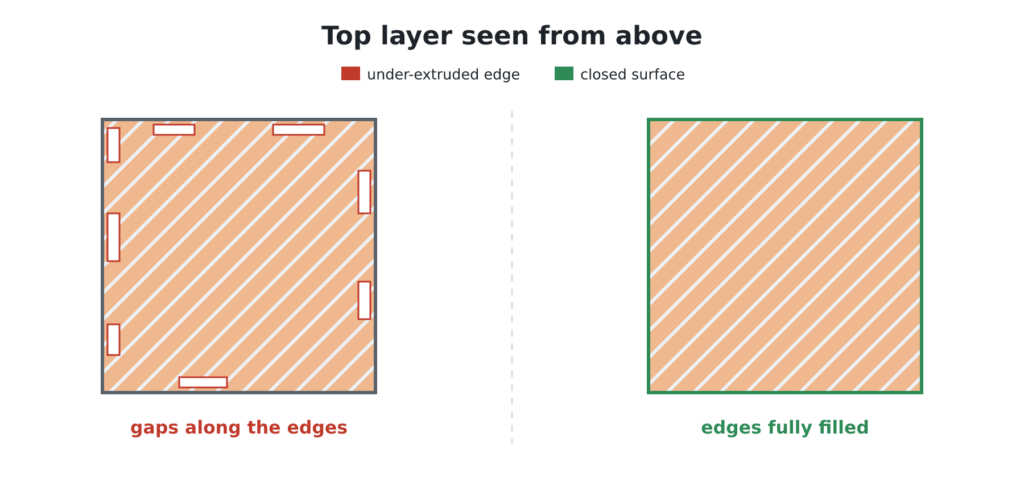
The weak spots are surface finish and the speed presets. Aurora Tech rated the Bambu Lab A1, Prusa MK4 (since replaced by the MK4S) and Kobra 2 Pro ahead on its Robo Alpaca surface test, and FauxHammer found under-extrusion on the edges of top and bottom layers using Anycubic’s own filament. Both FauxHammer and Aurora Tech saw visible cooling and quality losses on the 11–12 minute speed Benchy. If surface finish is your priority, that is the main thing to weigh.
Score: 7/10 · On our review scoring, printing quality 7 means: Good print quality, few imperfections. (Surface Finish: Good, Detail Accuracy: Good)
- “on the square side it can fit … all the way to 0.05 mm which is the perfect score” — Aurora Tech
- “compared to the Bambu Lab A1 the surface quality of the A1 is better but the speed of the Kobra 3 is much faster” — Aurora Tech
- “Prints have been clean, even at the fastest speeds.” — Dave Tries This
- “there have been a few areas of under extrusion, you can spot them slightly on the edges of bottom and top layers” — FauxHammer
Ease of use
Most of the printer arrives pre-assembled: Dave Tries This had it set up in about 20 minutes, and D DesignHub put assembly at under 30. After the short build, the automated self-test, bed leveling and input-shaping sweep take roughly 15 minutes, which M.M’s Prop Shop sped up in its video. Calibration is fully automatic, but not every reviewer got a good first layer straight away.
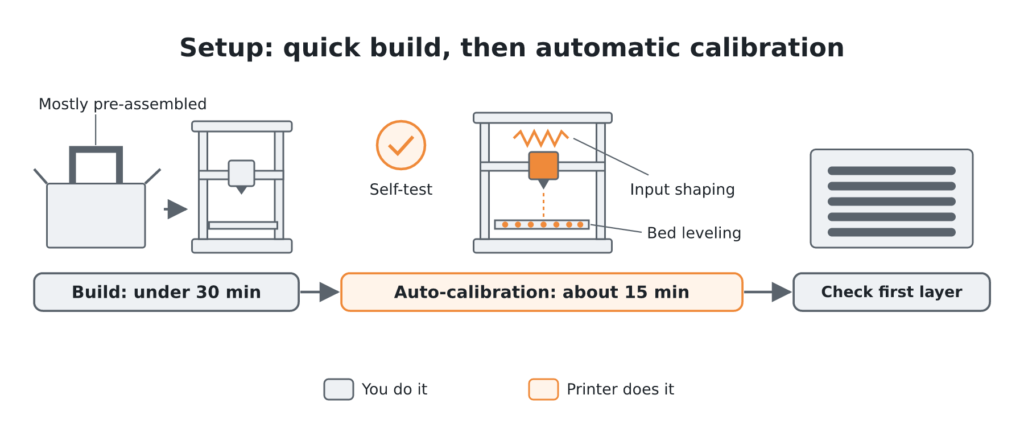
Aurora Tech found the auto Z offset slightly high on the first test print. FauxHammer disliked the alphanumeric Wi-Fi keyboard, and My Tech Fun could only connect over 5 GHz Wi-Fi, not 2.4 GHz. If your router is 2.4 GHz only, that last point matters.
Score: 7/10 · On our review scoring, ease of use 7 means: Quick setup, user-friendly calibration. (Setup Time: 30-50 minutes, Calibration Process: User-friendly, User Interface: User-friendly)
- “only took about 20 minutes to get set up and only a few more minutes to assemble and connect the ACE” — Dave Tries This
- “I figured we didn’t need to sit here for the 15 minutes that this probably took in real time” — M.M’s Prop Shop
- “in less than 30 minutes you’ll have your printer ready to go” — D DesignHub
- “the auto offset is a bit high for a small print like this it should be fine but for larger prints this may not be good” — Aurora Tech
Build Quality
Reviewers found the materials sturdy. FauxHammer praised the machined frame and silicone-sleeved cables, and M.M’s Prop Shop expects the all-metal magnetic purge wiper to last.
Several construction shortcuts were also reported. FauxHammer pointed to an exposed ribbon cable on the screen, and My Tech Fun found eccentric-nut wheel adjustment on the Y axis ‘so outdated’ and hard to reach.
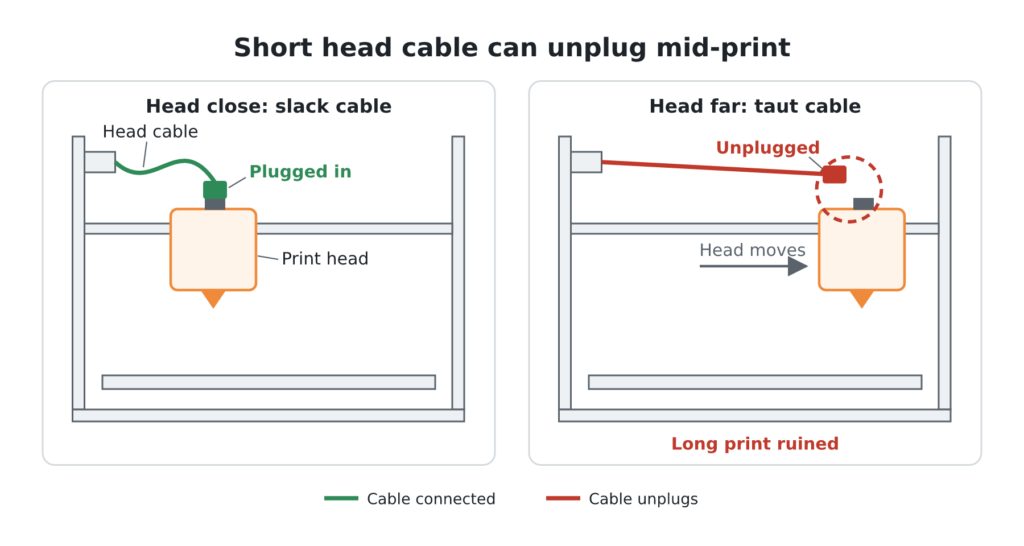
M.M’s Prop Shop said a head cable was an inch or two too short and kept unplugging itself during prints. Of the reported faults, that is the one that can ruin a long job.
Score: 6/10 · On our review scoring, build quality 6 means: Above average build quality, sturdy materials and components. (Frame Material: Good, Component Durability: Sturdy, Vibration Resistance: Fair)
- “the control screen does leave a loose ribbon cable exposed which is a little more legacy in terms of robust design” — FauxHammer
- “it seems to like unplugging itself from that connector piece when you are printing with this machine” — M.M’s Prop Shop
- “having the [ACE] cable there seems like a really strange choice” — Dave Tries This
- “this is loose on the Y axis I can see they’re loose and it is hard to access to them with this small open-end wrench” — My Tech Fun
Printing Speed
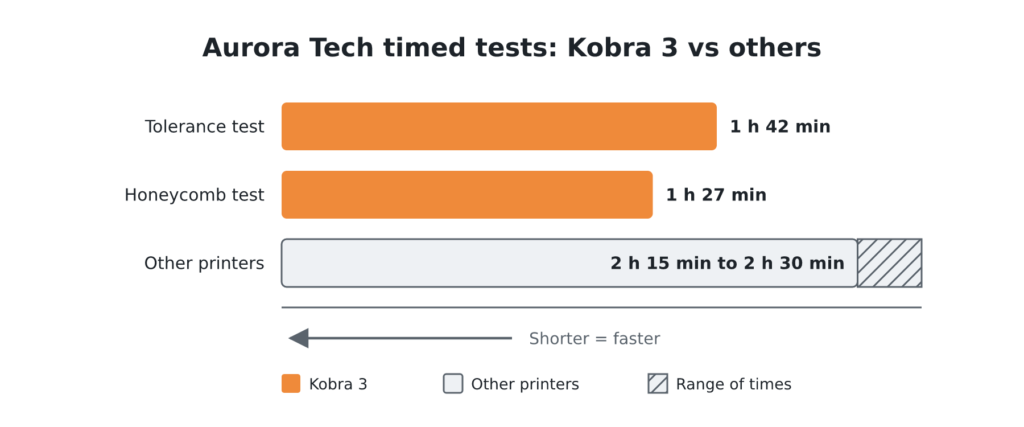
Reviewers’ timed benchmarks back up the Kobra 3’s fast rating. Aurora Tech’s tolerance test finished in 1 h 42 min and its honeycomb test in 1 h 27 min, against 2 h 15 min to 2 h 30 min on other printers.
Practical speed is lower than the headline rating. Aurora Tech found the default PETG profile capped at 75 mm/s by a 6 mm³/s flow limit, and found the Kobra 2 Pro faster on its Robo Alpaca test. FauxHammer argued the speed Benchy shows the printer outrunning what PLA can handle. Read the rated top speed as a ceiling, not an everyday speed.
Score: 9/10 · On our review scoring, printing speed 9 means: Exceptional print speed, highly efficient. (Print Speed: 300-350 mm/s, Max Speed: >350 mm/s, Default Acceleration: 1800-2000 mm/s², Max Acceleration: >3000 mm/s², Efficiency: Exceptional)
Manufacturer spec: max 600 mm/s, 20,000 mm/s².
⚠ Estimate: no reviewer measured a real print speed, so the score is estimated from their descriptions.
- Printing speed max 600 mm/s, acceleration 20,000 mm/s² — manufacturer
- “this print surprisingly finished in just 1 hour and 42 minutes which is way faster than the average 2 hour and 15 minute to 2 and 1/2 hour printing time” — Aurora Tech
- “by default the volumetric speed of PETG is set to 6 mm³/s which will limit the speed to 75 mm/s” — Aurora Tech
- “the way it can achieve this speed is by delivering a poorer quality print result” — FauxHammer
Community Support
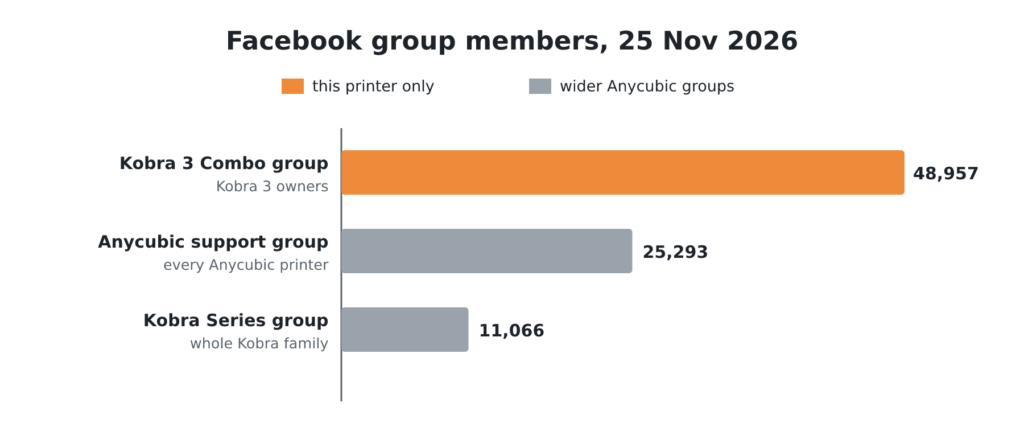
Kobra 3 owners have a big place to ask questions. On 25 Nov 2026 the Anycubic Kobra 3 Combo Multi-color Printer Group on Facebook, which is about this printer alone, had 48,957 members. Anycubic’s own Anycubic International – 3D Printers Support Group covers every Anycubic printer and had 25,293, and the Anycubic Kobra Series Group covers the whole Kobra family and had 11,066.
I count only groups I could open and read a member count on. The r/anycubic and r/AnycubicOfficial subreddits could not be counted from here, and I found no Discord server for the printer.
Documentation exists but is scattered. M.M’s Prop Shop had to dig through the Anycubic wiki to find the right slicer. No reviewer timed a reply in any of these groups, so how fast they answer is not measured.
Score: 8/10 · On our review scoring, community support 8 means: Very large and active community, quick responses and many resources. (Online Community Size: 10000-15000 users, Availability of Guides: Very Extensive, Responsiveness in Forums: 6 hours)
Measured: Facebook Anycubic Kobra 3 Combo Multi-color Printer Group 49K members; Facebook Anycubic International – 3D Printers Support Group 25.3K members, brand-wide; Facebook Anycubic Kobra Series Group 11.1K members, whole model family (counted 2026-11-25).
⚠ Estimate: community size is counted (size alone fits 10); guide quality and forum response time are estimated from reviewers, and the one reviewer who covered guides found the documentation scattered, not very extensive, so the score sits two bands below what size alone fits.
- “I had to go to the Anycubic wiki to go down to the Kobra 3 Combo and look at the slicer software available” — M.M’s Prop Shop
Features
The ACE Pro is the stand-out feature. Besides four-spool multicolor printing, it dries filament, switches to a backup spool automatically, and does RFID filament detection and tangle detection. Dave Tries This singled out that it can dry while it prints, which Bambu’s AMS does not do.
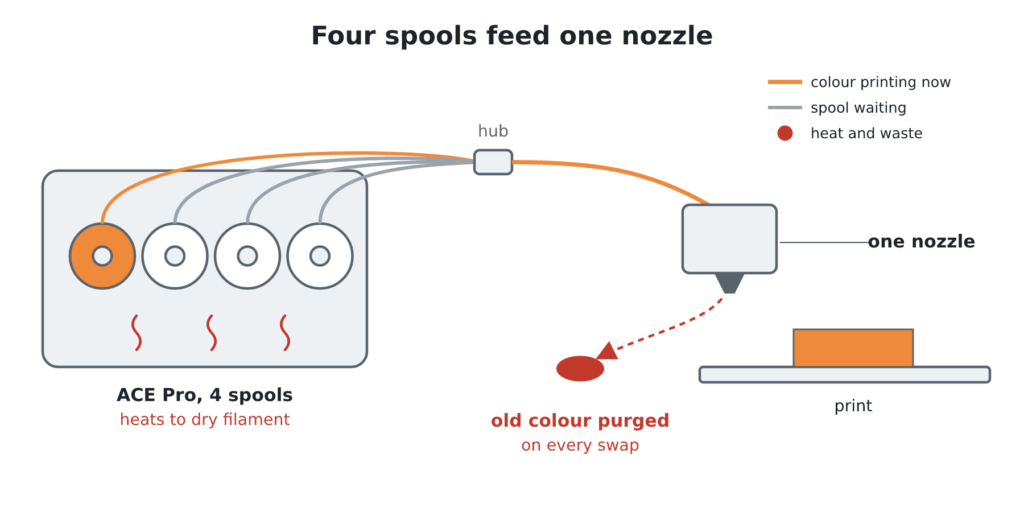
Other reported features include a tool-less nozzle change and a filament cutter (Micro Center), plus power-loss resume and nozzle clog detection that pauses the print (D DesignHub). Anycubic’s spec lists no enclosure, no air filtration, no webcam and a closed-source design. Dave Tries This notes a camera can be plugged into a USB port, but it had not been enabled in the software when that video was made.
My Tech Fun found the app’s online slicing took 15 minutes to start a print. On the desktop side, Dave Tries This found Anycubic’s slicer can paint models for multicolor and manage several Kobra 3 printers at once. When these reviews were made, LAN-only mode and eight-color printing with two chained ACE Pro units had been announced but were not yet available, so none of the reviewers could test them.
Score: 7/10 · On our review scoring, features 7 means: Advanced features, ample upgrade opportunities. (Available Features: Advanced, Upgrade Options: Ample, Open Source: Yes, External Upgrades: Extensive, Build Volume: 300 x 300 x 300 mm, Multicolor Printing: Yes, App: Yes, Offline: Yes, Ventilation: Yes, Filtration: Yes)
Manufacturer spec: build volume 250x250x260 mm, multicolour optional, enclosure no.
- “Even better, the system can dry while it prints.” — Dave Tries This
- “one of the other cool features of the Kobra 3 Combo is that it has a toolless nozzle change” — Micro Center
- “after 15 minutes it finally started this is way too slow” — My Tech Fun
- Enclosure No, Air Filtration None, Webcam No, OpenSource No, Multicolor Printing Optional — manufacturer
Reliability
No reviewer logged a formal success rate. Across eight channels, most reported prints finished, including long multicolor jobs. The documented failures are few but real.
FauxHammer’s first large print failed on bed adhesion until the bed was cleaned with isopropanol, and one of FauxHammer’s ACE slots would not read its RFID tag. M.M’s Prop Shop also ran into the short head cable described under Build Quality.
Micro Center’s multicolor Benchy failed its color swaps because a PTFE tube was not seated, which the reviewer attributed to user error.
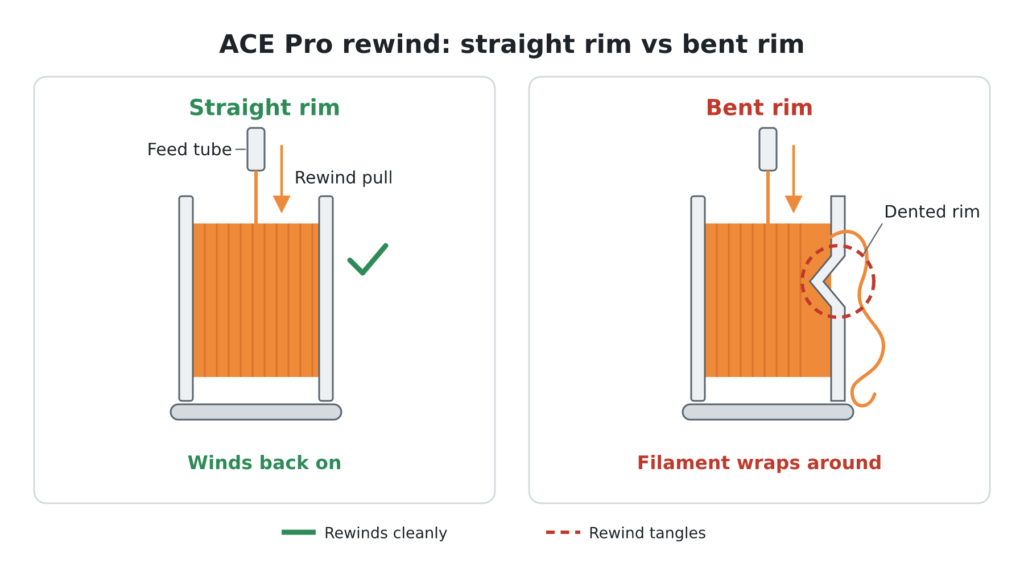
Dave Tries This put about 80 hours of printing through it and saw one type of failure: Y-axis shifts on some files sliced in Anycubic Slicer, which printed fine when sliced in Orca with Anycubic’s profile. The same review found the ACE Pro would not rewind properly when a cardboard spool’s rim was bent or dented, so filament wrapped around that spool or its neighbor. As of that video, Anycubic was not yet sure what its fix would be.
Score: 8/10 · On our review scoring, reliability 8 means: Very reliable, rare issues with prints. (Success Rate: 80-85%, Consistency: Highly consistent)
⚠ Estimate: no reviewer measured a success rate, so the score is estimated from their descriptions.
- “after the first attempt to print this pyramid failed, I thoroughly cleaned the bed with isopropanol. All of the subsequent prints were great.” — FauxHammer
- “I’ve put about 80 hours of prints through the [Kobra 3] and I’ve only had one type of issue with failed prints.” — Dave Tries This
- “the filament in the ACE will not rewind properly” — Dave Tries This
- “you have to make sure that all of the tubes in the back of the machine are plugged in tightly otherwise it won’t want to do the switches” — Micro Center
Customer Support
None of the eight reviewers contacted Anycubic support, so this Anycubic Kobra 3 review cannot verify response times or how well problems get resolved. The only indirect evidence is how Anycubic updated the product after launch, which leaves support an open question.
M.M’s Prop Shop was prompted to update firmware immediately after setup. FauxHammer warned that Anycubic still had profile tuning to do after release. Dave Tries This sent Anycubic feedback on the Y-axis shifts and saw a slicer update arrive within the month of testing, but on the cardboard-spool jams Anycubic had no answer yet.
Score: 5/10 · On our review scoring, customer support 5 means: Reasonable response time, average problem resolution. (Response Time: 12-24 hours, Problem Resolution: Average)
⚠ Estimate: no reviewer measured a support response time, so the score is estimated from their descriptions.
- “they did a slicer update in the month that I’ve been using this. That’s a good sign.” — Dave Tries This
- “as of this video, they’re not quite sure what their solution will be” — Dave Tries This
- “if Anycubic wants success, I mean real success with this one, which they honestly could have, then they can’t just release it and stop here” — FauxHammer
- “after that setup is complete it did immediately prompt me to update the firmware” — M.M’s Prop Shop
Where reviewers disagree
The eight reviewers behind this Anycubic Kobra 3 review contradicted each other in a few places. For a buyer, the first-layer and slicer splits matter most, since they decide how smooth your first week goes.
- First layer and Z offset. Micro Center called the first layer ‘gorgeous’. Aurora Tech found the auto Z offset slightly high on its first test print, and FauxHammer had repeated first-layer adhesion problems until the bed was cleaned with isopropanol.
- Speed presets. FauxHammer was unimpressed by the 11.5-minute Benchy and said speed is bought with quality. My Tech Fun called its 12-minute Benchy ‘not bad’, Aurora Tech found it acceptable considering the speed, and Dave Tries This said prints stayed clean even at the fastest speeds.
- Assembly. FauxHammer described an easy build. My Tech Fun and M.M’s Prop Shop hit the fit-and-finish snags covered under Build Quality.
- Slicer. 3D Printing Nerd and Aurora Tech sliced successfully in the original Anycubic Slicer. M.M’s Prop Shop said not to use it for multicolor because it could not open 3MF files, and found the Orca-based Anycubic Slicer Next was Windows-only at the time. Dave Tries This found Anycubic Slicer more capable than expected, but some files it sliced caused Y-axis shifts that the Orca profile did not.
- Purge waste. FauxHammer criticized the amount purged even when the color does not change. 3D Printing Nerd accepted it as inherent to single-nozzle multicolor and expects Anycubic to tune profiles to reduce it.
- Materials. Anycubic lists TPU, PC and other materials as compatible. Aurora Tech reports Anycubic only recommends PLA and PETG through the ACE Pro and warns TPU may jam its gears.
- Noise. Aurora Tech measured mid-50s dB and My Tech Fun measured 55–56 dB, consistent with the ~55 dB spec, though My Tech Fun also heard a fan running in standby.
Sum up
The reviewers behind this Anycubic Kobra 3 review point it at beginners and hobbyists who want affordable multicolor PLA and PETG printing. 3D Printing Nerd showed HueForge works once the slicer’s 0.12 mm minimum layer height is overridden. Because the ACE Pro also dries filament, it suits PETG users who want dry filament.
Skip it if you print TPU. Aurora Tech says Anycubic only recommends PLA and PETG through the ACE Pro and that TPU may jam it. With no enclosure or filtration, ABS and ASA work is limited. If you hate purge waste or need top-tier surface finish, look elsewhere.
At the launch prices reviewers reported ($449 for the combo per Aurora Tech, against Micro Center’s $549 list and $449 early-bird price), they judged it strong value. The combo bundles an enclosed four-spool unit that also dries filament. See how its specs line up on the Comparison chart.
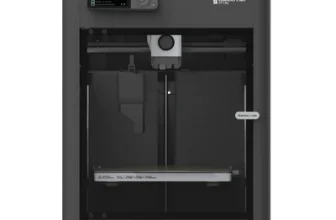
Against the Bambu Lab A1, Aurora Tech found the A1’s surface quality better but the Kobra 3 much faster. You can set the two side by side in Compare 3D Printers. FauxHammer noted that some competitors waste less filament on color changes. That speed-versus-surface trade is the main decision.
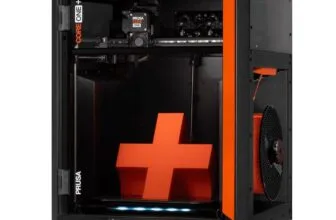
Against the Prusa MK4 with input shaper firmware, Aurora Tech rated the MK4’s surface better but the Kobra 3 much faster; Prusa has since replaced the MK4 with the MK4S, which Aurora Tech did not test. Against the Creality Ender 3 V3 CoreXZ, Aurora Tech found the Kobra 3 both faster and slightly better in quality.
Videos
Where to buy it

Price alert
Sources
- Aurora Tech — AnyCubic Kobra 3 Combo 3D Printer: Multiple filament printing, filament dryer, print up to 8 colors
- My Tech Fun — Great for PETG: Anycubic Kobra 3 – Combo with heated multicolor system
- 3D Printing Nerd — AWESOME Project on the Anycubic Kobra 3!
- Dave Tries This — ANYCUBIC Kobra 3 Combo beats BAMBU A1??- Full Review of The Amazing Competitor
- M.M’s Prop Shop — Is the Anycubic Kobra 3 the Best Budget Multicolor 3D Printer?
- D DesignHub — AnyCubic Kobra 3 Review | Multi-Color 3D Printer with Ace Pro Filament Dryer!
- Micro Center — Anycubic Kobra 3 Combo | Early Look and Close Up
- FauxHammer — Anycubic Kobra 3 Combo Review – DO YOU GET IT?
- Facebook — Anycubic Kobra 3 Combo Multi-color Printer Group
- Facebook — Anycubic International – 3D Printers Support Group
- Facebook — Anycubic Kobra Series Group